AI Labs
Example applications built on Kinetic
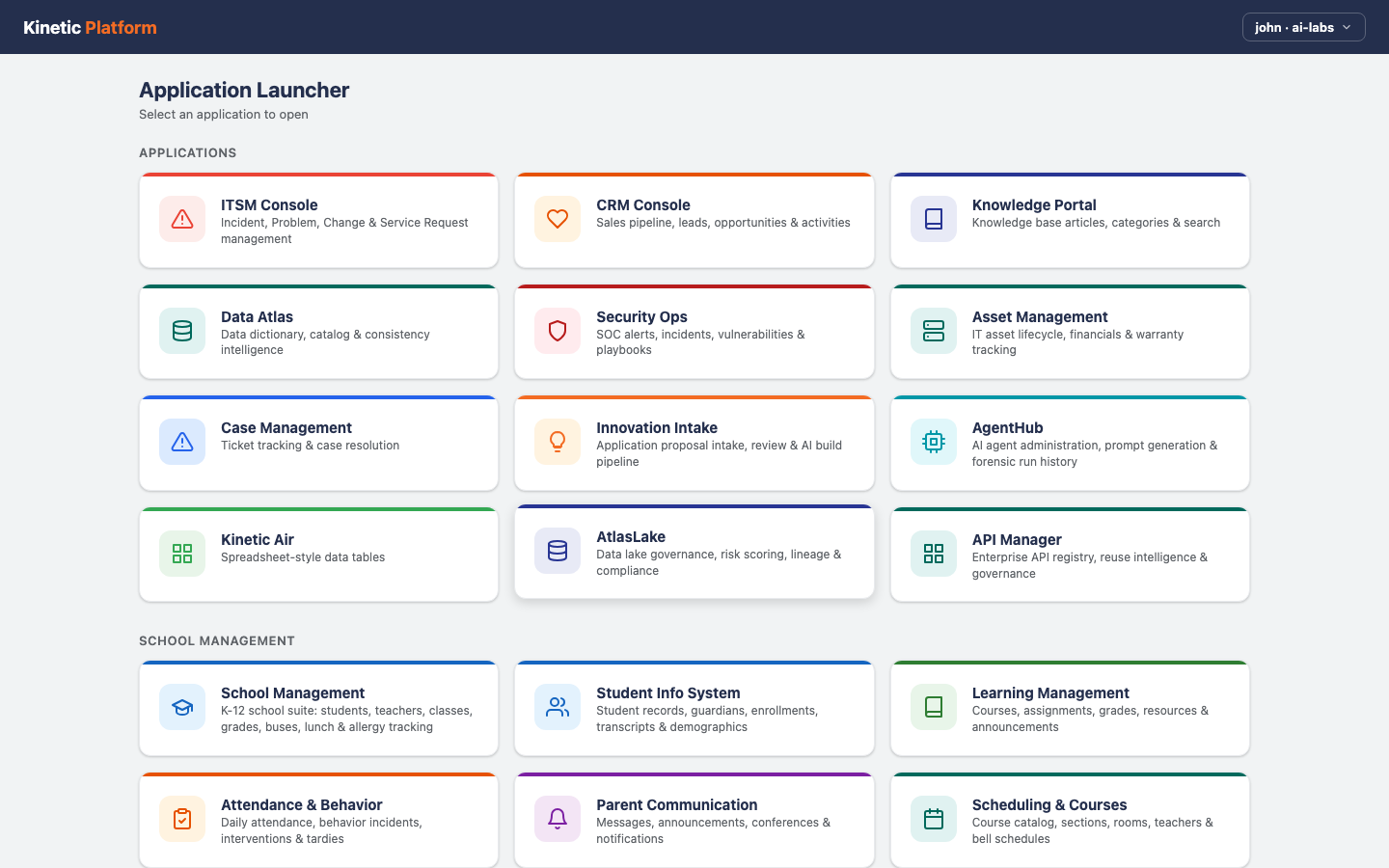
AI Labs is a set of 39 working applications built on Kinetic, from an IT service console to a DD-2875 access request. All of them run on one Kinetic environment with sample data. They are examples, not products for sale: open one to see what a finished build looks like before you plan your own.
One environment 39 applications across 5 categories, all running on the same Kinetic instance.
What you are looking at
Real
The screens and the approval steps behind them, including who is allowed to see what. They are built in Kinetic the same way a customer application is, so what you see is what a team would get if it built the same thing for its own process.
Not real
The data. All of it is sample data. None of these apps is sold or supported as a product, and none is a customer deployment.
Examples by category
Applications
Applications most organizations run somewhere: IT service management, CRM, security operations, asset tracking, a data catalog and an AI agent registry.
-
ITSM Console
Incident, Problem, Change & Service Request management
5 screens
-
CRM Console
Sales pipeline, leads, opportunities & activities
4 screens
-
Knowledge Portal
Knowledge base articles, categories & search
3 screens
-
Data Atlas
Data dictionary, catalog & consistency intelligence
4 screens
-
Security Ops
SOC alerts, incidents, vulnerabilities & playbooks
5 screens
-
Asset Management
IT asset lifecycle, financials & warranty tracking
4 screens
-
Case Management
Ticket tracking & case resolution
2 screens
-
Innovation Intake
Application proposal intake, review & AI build pipeline
3 screens
-
AgentHub
AI agent administration, prompt generation & forensic run history
5 screens
-
AtlasLake
Data lake governance, risk scoring, lineage & compliance
5 screens
-
API Manager
Enterprise API registry, reuse intelligence & governance
3 screens
School Management
Five K-12 applications that work as a set: student information, learning management, attendance, parent communication and the full school operations suite.
-
School Management
K-12 school suite: students, teachers, classes, grades, buses, lunch & allergy tracking
9 screens
-
Student Info System
Student records, guardians, enrollments, transcripts & demographics
4 screens
-
Learning Management
Courses, assignments, grades, resources & announcements
5 screens
-
Attendance & Behavior
Daily attendance, behavior incidents, interventions & tardies
4 screens
-
Parent Communication
Messages, announcements, conferences & notifications
4 screens
Industry
Applications for specific industries, from mining and oil and gas compliance to hotels, restaurants and a golf shop.
-
SchoolForGood
School management with sites, members, trainers & classes
4 screens
-
Mining Ops
Mining compliance, operations, environmental monitoring
7 screens
-
Oil & Gas Compliance
Compliance, CAPA, audits & ESG sustainability for O&G
5 screens
-
Hotel Management
Room inventory, guest profiles, reservations, front desk & housekeeping
6 screens
-
HotelGuru
Multi-property hotel operations across brands and regions
8 screens
-
Restaurant Man
Inventory, menus, reservations & P&L
5 screens
-
Golf Shop
Inventory, employees & 3-bay driving range scheduling
4 screens
Healthcare
Applications for hospitals and health systems, from provider credentialing and patient safety reporting to payer contracts and clinical research.
-
Credentials Mgr
Healthcare provider credentialing, privileging & compliance
7 screens
-
Compliance & Reg
Joint Commission, CMS, OSHA compliance tracking & readiness
5 screens
-
Vendor Credentialing
Vendor rep credentialing, facility access & visit tracking
7 screens
-
Clinical Equipment
Biomedical device tracking, maintenance, FDA recalls & lifecycle management
5 screens
-
Patient Safety
Near-miss & adverse event reporting, RCA, CAPA tracking & regulatory disclosure
7 screens
-
Contract Lifecycle
Payer contract management, fee schedules, amendments & compliance
7 screens
-
Supply Chain
Supply chain resilience, inventory, disruptions & vendor management
7 screens
-
Third-Party Risk
Vendor cyber risk assessments, certifications & remediation tracking
7 screens
-
Clinical Research
Clinical trial operations, enrollment, adverse events & regulatory
7 screens
-
Data Governance
Enterprise data assets, quality rules, policies & access governance
7 screens
-
Workforce Optimization
Staffing analytics, scheduling, vacancies & productivity
7 screens
-
Physician Performance
wRVU tracking, quality metrics, compensation & benchmarks
7 screens
-
Grants & Funding
Research grants, applications, awards, budgets & compliance
7 screens
-
Capital Assets
Facilities lifecycle, work orders, inspections & capital projects
7 screens
Department of Defense
DoD forms rebuilt as guided digital forms, with approvals and a record of every action.
What you can build next
The examples show finished screens. These pages show how the same pieces run real processes across the systems an organization already owns.
-
How the screens are built
Every screen in these examples is made in the experience layer. See what you can build there and how AI drafts it.
-
Healthcare, with real workflows
14 of the examples are healthcare apps. The healthcare page shows how a referral runs across Epic and the systems around it.
-
DD-2875 as a running process
The DD-2875 example shows the form. The use case shows the approvals in order, CAC sign-in and provisioning behind it.
Frequently asked questions
Answered by Kinetic Data. Last updated .
-
Are these products we can buy?
No. They are examples, and we don't sell or support them as products. What you buy is Kinetic, the platform they run on, and you can start from one of these when you build your own.
-
Is the data real?
No. Every example runs with sample data on a Kinetic environment we keep for demonstrations, and none is a customer deployment.
-
Can we start from one of these?
Yes. In a working session we can open the closest example, compare it with how your process runs today and plan what would change, including which of your own systems it would need to read from and write to before anyone could use it for real work.
-
None of these matches our process. Does that matter?
No. The examples show the kinds of screens and steps Kinetic produces, not a fixed list of what it can do. A working session starts from your own process, and an example is only a reference point.
Pick an example. We'll map it to your process.
In a free two-hour working session we open the example closest to what you need, compare it with how the work runs today, and give you a written plan for building your version on Kinetic.