
State and Local Government

Constituent relationship management for state and local government

Constituent relationship management (CRM) in government means one place for residents to request services and check status across every department. Kinetic builds that portal and the cross-department workflows on top of your permitting, licensing, case and finance systems, so a resident asks once and each department works the request in the system it already uses.

Fairfax County Public Schools About 250,000 service requests a year across 200+ schools, through one front door. Fulfillment time fell by half. Read the FCPS case study

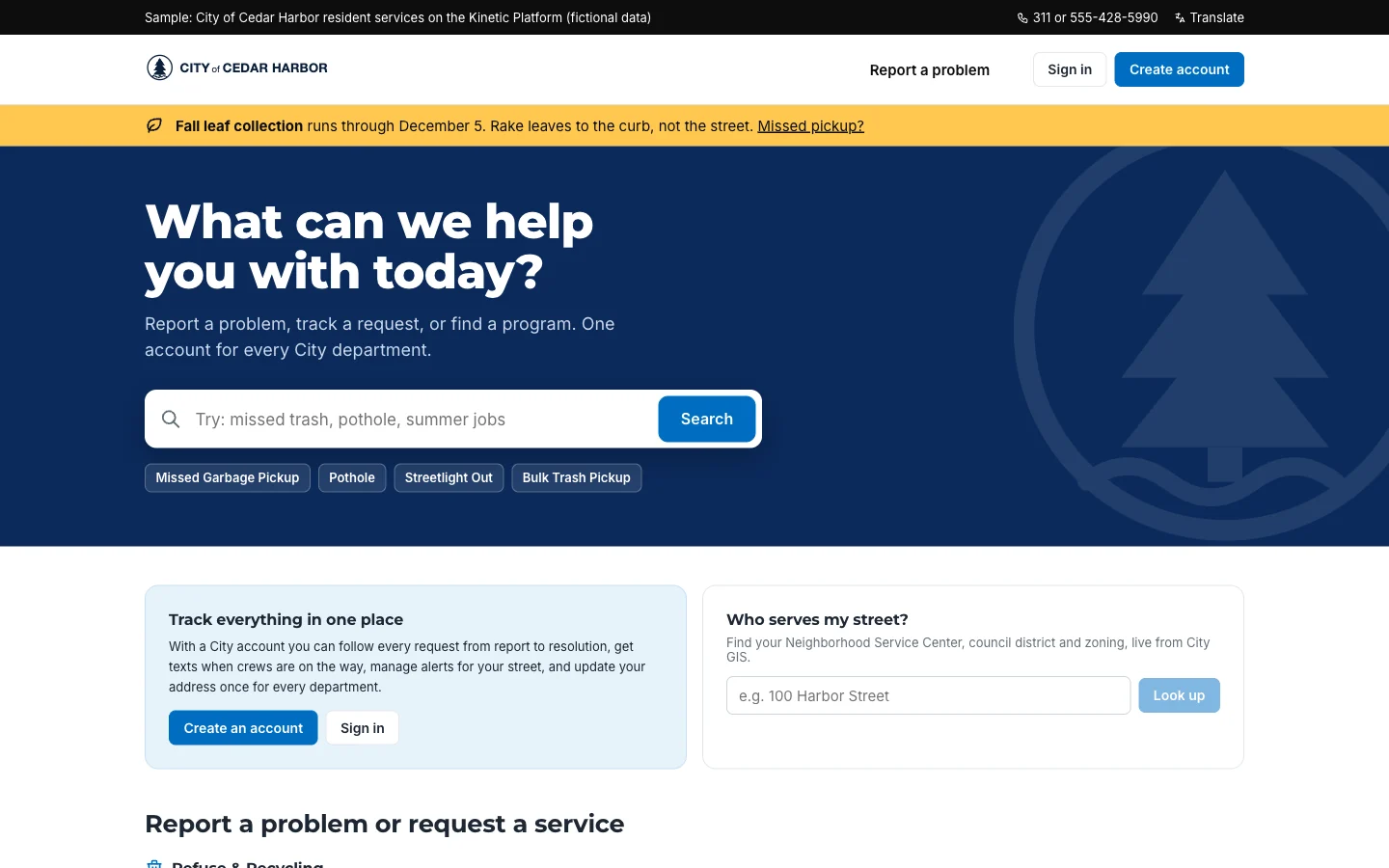
City of Cedar Harbor resident portal home page with the heading What can we help you with today, a service search box, quick links for missed garbage pickup, pothole, streetlight out and bulk trash pickup, and panels to create an account or look up who serves your street.
A city's front door built on Kinetic: one search across every service, each request routed to the department that owns it. City of Cedar Harbor · fictional organization, sample data

Every department has its own counter, form and login

Opening a café can mean four offices (zoning, building, environmental health and business licensing), each with its own application and its own system, and staff who re-key the same name, address and parcel number into every one of them. When the owner wants to know where things stand, they phone. Then they call their council member.

For residents

  • A separate form and login for each department
  • Name, address and parcel number typed in again at every counter
  • No way to see whether a permit is with zoning or building
  • A call to the council office to find out what happens next

For staff

  • Re-keying applications into the permitting and licensing systems
  • Forwarding requests between departments by email
  • Answering status calls instead of reviewing plans
  • Tracking spreadsheets and one-off web forms nobody else can see

Departments patch the gaps with a tracking spreadsheet, a standalone web form or a chatbot that can't see the case file. Each patch helps for a while. Then it becomes one more place a request gets lost.

How government CRM differs from sales CRM

Same three letters, different job. In government, CRM is the record of what residents asked for and where each request stands in every department involved.

Constituent relationship management compared with sales CRM
Attribute Constituent relationship management Sales CRM
Who is in the record Residents, businesses and community groups Prospects and customers
What it tracks Service requests, applications and cases, with their status in each department Leads, opportunities and deals
What it connects Permitting, licensing, case management, finance, GIS and payments Marketing and billing tools
How success is measured Days to permit, repeat calls avoided, requests closed by council district Pipeline and revenue

Flagship use case

How one café permit moves through four departments

Here is a single request from start to finish. Today it would take four applications at four counters.

Example: a small business owner opening a café

  1. Step 1 Experience layer

    One application instead of four

    The owner signs in once and describes the project, a 40-seat café with a new hood vent in a former shoe store, and those answers carry into every department's form.

  2. Step 2 Workflow layer

    AI works out which permits apply

    From the description and floor plan, AI identifies a change-of-use review, a mechanical permit, a food service plan review and a business license. The seating layout is missing. AI flags it.

    AI step

  3. Step 3 Workflow layer

    Each department gets its own task

    Each office receives its piece, in order. Building review can't start until zoning signs off.

  4. Step 4 Integration layer

    Tasks land in the systems departments already use

    The building permit is opened in the permitting system, the parcel is checked against GIS, and plan review fees go through your payment processor.

  5. Step 5 Workflow layer

    Reviewers make the decisions

    The plans examiner works from the building queue. AI drafts the comment letter; the examiner edits it and signs.

    Person approves

  6. Step 6 Experience layer

    Everyone sees the same status

    The owner sees “Building review: comments issued” and books the health inspection from the same page. When they call their council member, the district office sees exactly what they see.

  7. Step 7 Integration layer

    Records stay where they belong

    Permit, license and receipts stay in their systems of record. Kinetic keeps the history that ties them together. That history is what you hand over when a records request arrives.

What AI does here

  • Works out which permits and licenses a project needs.
  • Reads attachments and flags what is missing before a reviewer opens the file.
  • Drafts comment letters and summarizes long case histories.

What staff decide

  • Every permit, license and eligibility decision.
  • Any reply that commits the city or county to an answer or a date.
  • Exceptions, which the workflow sends to a supervisor.

In development Support for residents' own AI assistants filing and following requests directly is in development. For now, an assistant connects the way any other system does, through the Kinetic API.

The portal is built in the experience layer; resident-facing portals are part of Client Management.

Other services on the same portal

Each one reuses the resident login, the request record and the department connections built for the first.

  • 311 and service requests

    Potholes, missed pickups and dark streetlights, sent to the crew's work order queue with the address verified.

    Constituent request portals
  • Permit and license applications

    Applications that check completeness before submission and reach every reviewing department at once.

    Connected forms
  • Business onboarding

    Registration, zoning, permits, licenses and tax setup as one path for a new business.

  • Public records requests

    Intake, assignment, redaction review and release, with the statutory clock running from day one.

  • Benefits and program enrollment

    Eligibility questions, document upload and caseworker review for assistance programs.

  • Grant management

    Applications, scoring panels, awards and reporting for grants you issue or receive.

    Example grants application
  • Council correspondence

    Council member inquiries logged, assigned and answered on a deadline.

  • Volunteer programs

    Sign-ups, background checks, shift scheduling and hours for volunteers and community partners.

Where it runs, and who sees what

  • Kinetic-hosted or customer-managed

    Use Kinetic's hosted cloud, or install Kinetic in your own data center or government cloud tenant.

  • Staff sign in with your directory

    Single sign-on through SAML or OIDC, including Entra ID and Okta. Staff see their department's queue; residents see only their own requests.

  • Records and retention

    Every request records who submitted, reviewed and approved each step. Your records schedule decides how long that history is kept.

  • Certifications and contract vehicles

    Ask us for the current list for your state. We don't publish a certification or vehicle here until it is confirmed.

The same platform is deployed in DoD IL5 environments, including Army INSCOM, with CAC sign-in. Federal and defense deployments
Proof

A school district's result, and the design behind this page

Fairfax County Public Schools runs the same pattern at scale. The café flow and the Cedar Harbor screens come from the reference architecture further down, which is a design rather than a customer deployment, and in a briefing we map it to the systems your departments actually run.

Local public sector

Fairfax County Public Schools

Teachers at one school phoned the help desk. At another, paper forms. FCPS put one Kinetic front door over its existing systems for more than 200 schools and facilities, and approvals that used to sit in an administrator's inbox for days now take minutes.

Read the FCPS case study
Faster fulfillment
50%
Requests a year
250K

Reference architecture: a resident portal across departments

Reference architecture
  1. Experience layer

    Front doors

    • Resident portal and chat
    • Department queues
    • Council office lookup
    • Leadership dashboard by district
  2. Workflow layer

    The shared request

    • One request record per resident need
    • Routing and sequencing by department
    • Deadlines and escalation
    • AI triage, drafts and summaries
  3. Integration layer

    Systems of record

    • Permitting and licensing
    • Case management and 311 work orders
    • Finance, ERP and utility billing
    • GIS, payments and records management

Kinetic reaches department systems through prebuilt connectors where they exist and through REST APIs, databases and files where they don't. No data is migrated. How the integration layer connects

Frequently asked questions

Answered by Kinetic Data. Last updated .

  • What is constituent relationship management in government?

    It gives residents one front door and one record across the departments that serve them. A resident submits a request once, each department works its part, and everyone sees the same status. Unlike a sales CRM, it tracks requests and cases, not deals. If you already own a CRM platform, Kinetic connects to it like any other system.

  • Is Kinetic 311 software?

    Kinetic can run your 311 front door: intake through the portal, routing to the right department, and status residents can follow. Crews keep working in their existing work order system, and Kinetic updates the request when they close it.

  • Do we have to replace our permitting or licensing system?

    No. Kinetic reads from and writes to those systems through connectors and APIs, and they remain the official record. What Kinetic adds is the resident portal and the hand-offs between departments, which permitting software was never built to manage.

  • What does AI do, and which models can we use?

    AI reads applications, works out which permits apply, drafts comment letters and summarizes long case files. Staff make every permit, license and eligibility decision. Kinetic doesn't include a model: agencies use Claude, Amazon Bedrock, Azure OpenAI or a self-hosted open model.

  • Where do agencies usually start?

    With one high-volume service: 311, a common permit type or records requests. Once it runs, the portal, routing and connections are in place. The second service reuses them.

Pick the service residents call about most. We'll map it with you.

A free, two-hour briefing. We trace one service across the departments and systems involved, show what Kinetic would build on top, and cover hosting, records retention and how agencies like yours buy.