Defense
Missile Defense Agency
50–65% faster completion
Requests that used to move by email now route in two days instead of five, with 40% fewer exceptions.
Read the MDA case studyWork Management
Kinetic Work Management runs requests that cross HR, IT, finance and operations, such as onboarding, access changes and purchase approvals. One workflow carries each request through your HRIS, identity, ITSM and ERP, handling the approvals and escalation, using AI for triage, and showing everyone the same status.
Missile Defense Agency 9,000+ users on workflows built over existing systems. Routing that took five days now takes two. Read the MDA case study
A new hire touches five systems before day one. Each does its part well. The handoffs between them run on email and memory, so teams keep their own trackers, buy point tools, and lately connect AI assistants of their own. The request still stalls in the gaps.
One new hire, five systems
Access requests, purchase approvals and role changes go through the same six stages, whoever submits them and however busy the approvers are. The workflow layer runs them in the same order every time.
Workday marks a new hire as ready. A portal form or an API call starts other requests the same way.
AI reads the offer details, picks the role template and writes a two-line summary for the manager.
The manager approves software access. Finance approves the laptop only if it is over the standard budget.
A badge request idle for two days goes to the facilities lead. Account setup keeps running meanwhile.
Kinetic creates the Entra ID account, opens the laptop order in ServiceNow and books a desk, in parallel.
The new hire, the manager and HR see one checklist that updates as each system reports back.
An agent's output lands on the same request as everyone else's, in front of the person who owns the decision. What an agent can start is limited to what its user account is allowed to do.
All three kept their systems of record and moved the work between them into Kinetic.
Defense
50–65% faster completion
Requests that used to move by email now route in two days instead of five, with 40% fewer exceptions.
Read the MDA case studyFinancial services
85% less manual work
HR, IT and security used to coordinate each new hire by email, typing the same details into three systems. Provisioning now starts from the HRIS record.
Read the GreenState case studyDefense
Recruiter workload halved
An 85-page paper packet gave way to automated screening and routing. Weekly admin time fell from 25 hours to 12.5.
Read the INSCOM case studyThe two most common first workflows are employee onboarding and access requests.
Connects Workday · SAP SuccessFactors · Active Directory · Microsoft Entra ID
Read the use caseConnects Active Directory · Workday · SAP · ServiceNow
Read the use caseConnects Splunk · Tenable · Qualys · Active Directory
Read the use caseConnects Workday · SAP · Oracle · ServiceNow
Read the use caseConnects SAP · Oracle · Microsoft Dynamics 365 · Coupa
Read the use caseConnects Active Directory · Microsoft Entra ID · ServiceNow · SharePoint
Read the use caseConnects Workday · SAP SuccessFactors · Okta · Active Directory
Read the use caseConnects Okta · Active Directory · Microsoft Entra ID · ServiceNow
Read the use caseConnects Okta · Active Directory · Microsoft Entra ID · Workday
Read the use caseConnects Workday · SAP SuccessFactors · Okta · Active Directory
Read the use caseConnects Splunk · Microsoft Sentinel · CrowdStrike Falcon · Okta
Read the use caseFinance work crosses the ERP, the procurement tool, receiving and the expense system, and each one holds only its own piece. Most of the effort goes into exceptions: the invoice that does not match, the entry that breaks a posting rule, the intercompany balance that does not tie out. These workflows handle the routine items automatically and put each exception in front of the person who owns it.
A purchase request starts on one form. Kinetic checks the budget in the ERP, routes it to the approvers its amount and category call for, and raises the purchase order in the procurement system. Contract requests take the same route with legal review added.
Kinetic compares the purchase order, the receiving record and the invoice across procurement, receiving and AP. Invoices that agree go on to payment. A mismatch becomes a task for the AP owner with all three documents attached; an AI step can point to the line that differs, and the AP owner decides what happens next.
Each entry is validated against your posting policy (the account and the amount threshold, plus the supporting document it requires) before it reaches the general ledger in SAP or whichever ERP you run. An entry that fails goes back to its preparer with the reason.
Balances between entities are compared each period. A difference opens one exception that both entity accountants work from, with the supporting transactions attached and the status visible to the controller.
Close tasks run as one checklist across the ERP and the procurement system. The controller sees who owns each task and when it is due, and an overdue reconciliation goes to its owner's manager.
For the auditors. Every approval records who made it, when and why. The workflow will not let the person who prepared an entry or a payment approve it, and the evidence for each item can be exported across systems when the auditors ask for it. See how the same records support compliance and audit workflows.
This program routes each case from intake through investigation, analyst review and a manager's decision. Every case shows which stage it is in, and the dashboard counts what is waiting on whom.
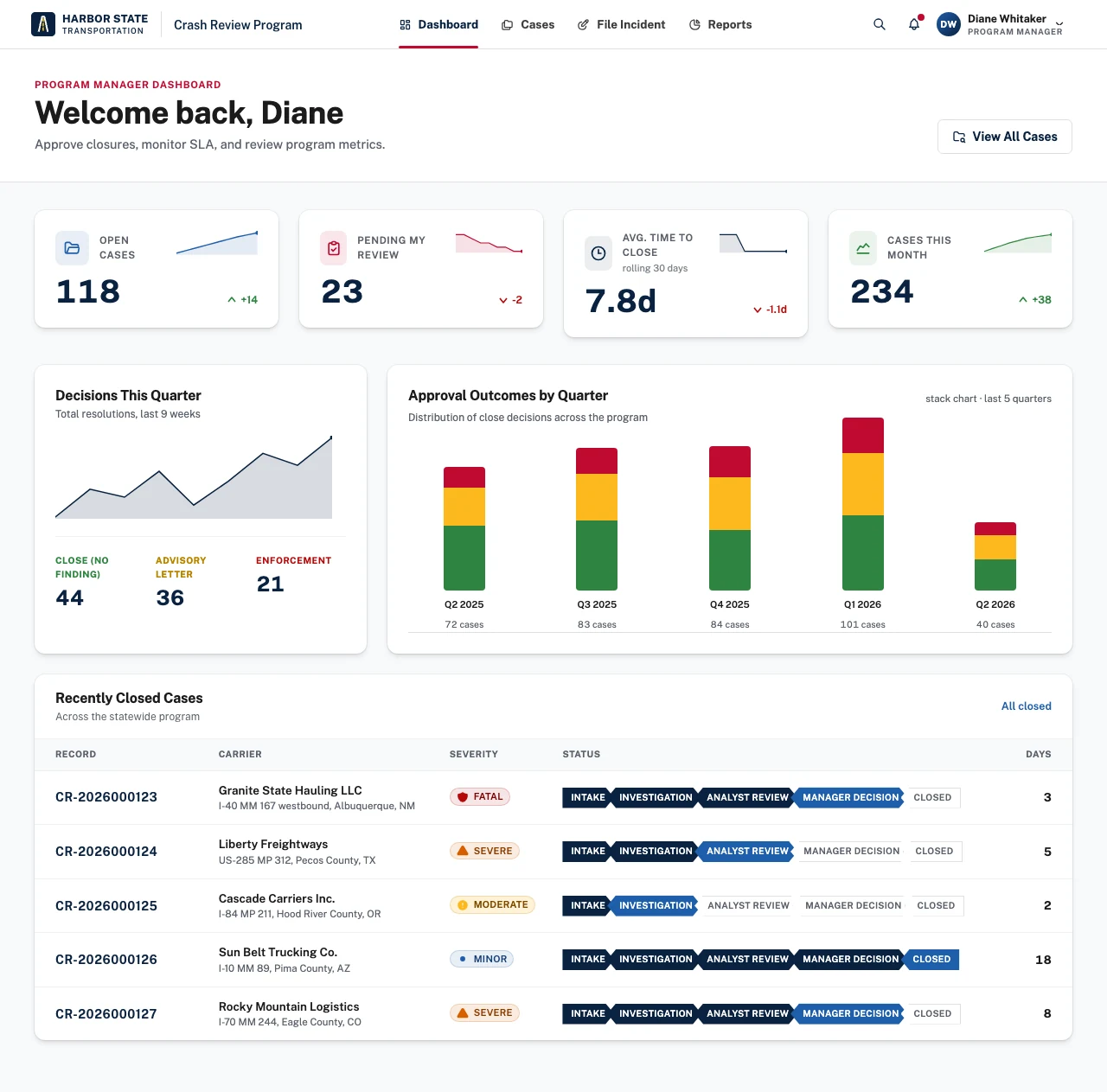
Once the handoffs between HR, IT and finance run in one workflow, other teams can reuse them.
Answered by Kinetic Data. Last updated .
It is the set of workflows that carry a request through every system it touches, such as Workday, Entra ID, ServiceNow and the ERP. Kinetic runs the approvals, deadlines and escalation, and shows everyone involved the same status.
Task tools track work that people do by hand. Kinetic does the work in the other systems: it creates the account, opens the order and records the approval. People handle only the decisions that need a person.
AI classifies requests, pulls details out of documents, summarizes a case for the approver and drafts replies. It does not change the route a request takes, and it does not approve anything with consequences. The workflow sets the order of steps and people sign off.
Yes. Through Kinetic's MCP server, an assistant such as Claude drafts forms and workflows inside Kinetic, and your team reviews them before they go live. The same server can create records and start workflows, limited to what the signed-in user is allowed to do.
Agents start and read requests today through the REST API or MCP, so their work goes through the same approvals and status as everyone else's. Native agent work exchange, where agents pick up and hand back work as participants, is in development.
No. Kinetic connects to them through connectors and APIs. Moving approvals and routing into Kinetic usually means less custom code in ServiceNow or the ERP, because the cross-system logic no longer has to live there.
Two hours with our team, at no cost. Bring one process that crosses your systems. We map it with you, show what Kinetic would build, and send you a written plan afterward.