Data to action · For BI and data leaders
Turn warehouse data into business action
Kinetic connects Snowflake, Databricks and similar platforms to the people and systems that act on the data. A flag in the warehouse opens a workflow, AI drafts a recommended action, a person approves it, and Kinetic updates the system of record and writes the outcome back to the warehouse.
Works with Snowflake, Databricks and similar platforms, through APIs and connectors. The data team sets the permissions.
Dashboards and models stop at insight
You built the warehouse and the models, and acting on what they find still means opening three systems and chasing three people. A model nobody puts into operation is the most expensive kind, and most data teams have no application layer of their own.
What happens after the alert today
- The dashboard shows a supplier is late on 40 orders.
- Then someone exports a CSV, opens the ERP, emails procurement and pings the account owner.
- Two weeks later nobody can say what was decided or who approved it. Whether it worked is anyone's guess.
Detect, decide, act, and feed the outcome back
Each stage maps to one layer of Kinetic, and the last one closes the loop.
-
01 · Integration layer
Detect
Kinetic picks up a signal from your warehouse or lake, such as a breached threshold or a failed quality check. It reads through APIs and connectors, with credentials your data team controls.
About the integration layer -
02 · Workflow layer
Decide
The signal opens a workflow and lands with an owner, with a deadline attached. An AI step explains the exception and drafts a recommendation. The owner approves it, edits it or rejects it.
About the workflow layer -
03 · Experience and integration layers
Act
Kinetic writes the approved change to the ERP, CRM or HRIS. Everyone involved can follow it in an app built in Kinetic.
About the experience and integration layers
Feedback path. The decision, the approver and the result are written back to the warehouse, so you can measure which signals change the business.
Four applications BI teams build first
Each starts with a signal you already compute. Related patterns are in the use case library.
-
Exception handling from warehouse alerts
A late shipment or an out-of-policy expense opens a case with an owner, a deadline and an AI-drafted explanation of what looks wrong.
Connects: Warehouse or lake, ERP, finance
-
Decision workflows from dashboards
When a metric crosses its threshold, the decision it calls for goes to the person who owns it, with the numbers and a suggested action attached.
Connects: BI tools, warehouse, ERP
-
Forecast to action
Next month's staffing forecast becomes draft schedule changes. A manager reviews them before anything changes in the scheduling system.
Connects: Warehouse, ERP, HRIS, scheduling
-
Data quality remediation
A failed quality check becomes a task for whoever owns the source record. The fix is tracked, and the check runs again.
Connects: Warehouse, systems of record, data catalog
Why the BI team owns it
Built for the team that owns the data
BI teams own the data AI depends on, and they are increasingly asked to answer for what AI does with it. Kinetic lets them act on that data without becoming an app team.
-
The data team defines the triggers and rules
You decide which signals open work and who owns each exception. The rules live in Kinetic, so changing one does not need a ticket to an app team.
-
Outcomes come back to you
Each decision and approval is recorded and written back to the warehouse. You can measure which models and alerts lead to action.
-
No application code to write
An AI assistant drafts the forms and workflows in Kinetic through MCP. Your team reviews them before they run.
Reference architecture In development
A reference build for duplicate payments
We are building this example on a common warehouse so you can watch the whole loop run. It is a reference build, so there are no customer results attached to it.
In the workshop we map one of your own signals to the same pattern.
- 01 Warehouse A scheduled query flags invoices that look like duplicate payments.
- 02 Kinetic workflow Each flagged invoice opens a case and routes it to the accounts payable owner.
- 03 AI step AI compares the invoices and drafts a resolution: hold, release or recover.
- 04 Person The AP owner approves or changes the recommendation in a Kinetic app.
- 05 Integration Kinetic updates the payment hold in the ERP and writes the outcome back to the warehouse.
Ask the data a question, then act on the answer
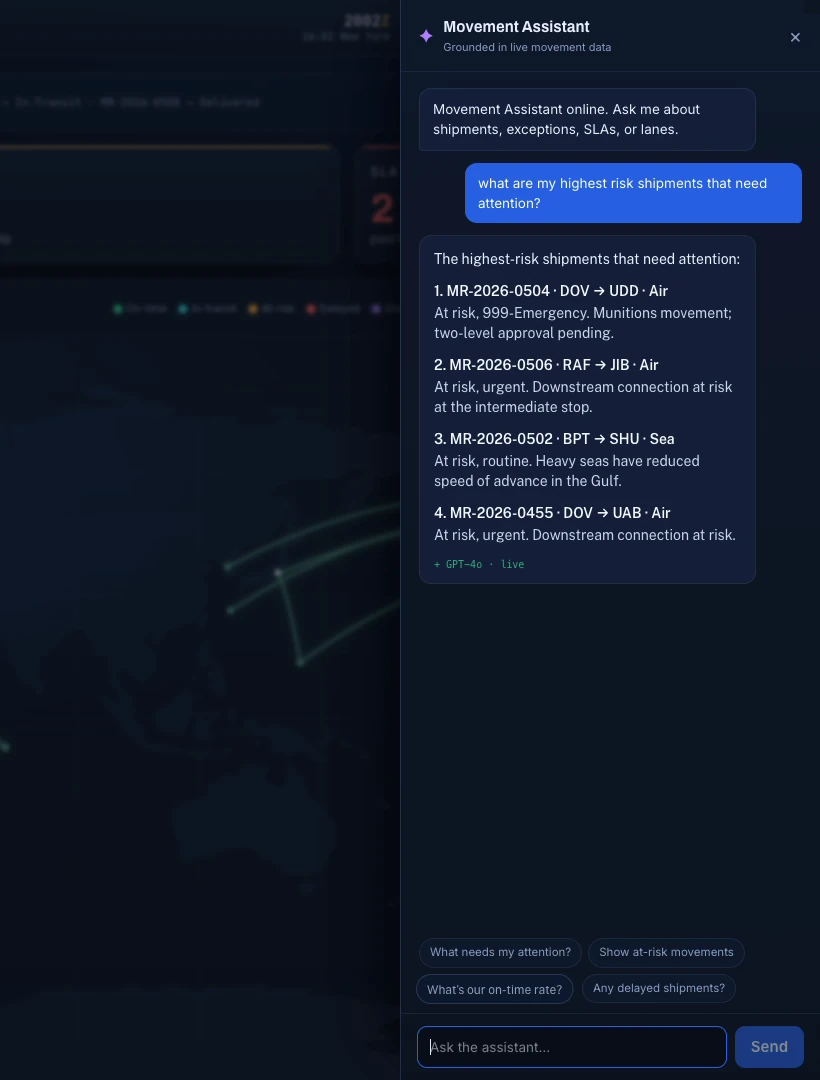
In this build, a logistics team asks which shipments need attention. The assistant reads the live movement records and answers with four of them and the reason each is at risk. From there, a person opens the record and starts the workflow that deals with it.
The model drafts the answer. It does not change a shipment, reroute a lane or approve anything. Those steps stay in the workflow, with the people who own them.
What you can build next
Data-driven work and people-driven work end up in the same queues. These are the two areas that share them.
Questions data leaders ask
Answered by Kinetic Data. Last updated .
-
How does Kinetic read from and write to the warehouse?
Through APIs and connectors, using a service account and permissions your data team sets. A scheduled query or an event can start a workflow, and Kinetic writes outcomes back to a table you choose. We confirm the pattern for your platform in the workshop.
-
Does data leave our boundary?
It does not have to. Kinetic reads only the rows a workflow needs and keeps no copy of the warehouse. You can run Kinetic in our cloud, as a customer-managed install or air-gapped, and run the AI model on your own hardware.
-
Which AI models can we use?
Kinetic does not ship a model. Customers use Claude, Amazon Bedrock, Azure OpenAI, self-hosted open models or any model that supports MCP. The model gets one defined step, such as explaining an exception.
-
How is this different from reverse ETL or a BI tool's alerts?
Reverse ETL copies data into operational tools, and a BI alert sends a notification. Neither assigns an owner, gets the decision approved and records what happened. Kinetic does those steps and can run alongside both.
Bring one signal. Leave with a plan to act on it.
In a data-to-action workshop we take one exception, threshold or forecast from your warehouse, map the decision and approval it calls for, and show how Kinetic writes the result back to your systems of record. No cost.