Client Management

Client management portals for clients, vendors and residents

Kinetic Client Management builds portals for clients, suppliers, members and residents on top of the CRM, ERP, case and payment systems you already run. People outside the organization ask once and can see where their request stands. Each request updates the real record. Most Kinetic customers start here.

Gracie Barra 800+ franchise schools on one platform built with Kinetic. Members train at any school without a manual check. Read the Gracie Barra case study

Systems of record were bought for staff, not for the people staff serve

So when a supplier or a resident needs something, it goes to email or to a portal one department bought on its own. That is usually the first thing customers rebuild in Kinetic.

Today

Every request is a workaround

  • Problem: A different form, inbox and phone number for every kind of request
  • Problem: Staff retype the same details into the CRM, the ERP and the case system
  • Problem: Clients ask for status by email because no one screen shows it
  • Problem: A department buys its own portal, and it never talks to the rest
With Kinetic

One portal, wired to the real systems

  • With Kinetic: One portal, in your brand, for every request type
  • With Kinetic: Each request updates the record it belongs to
  • With Kinetic: Clients and staff look at the same status
  • With Kinetic: The next portal reuses this one's workflows and connections

What a resident sees, and what runs behind it

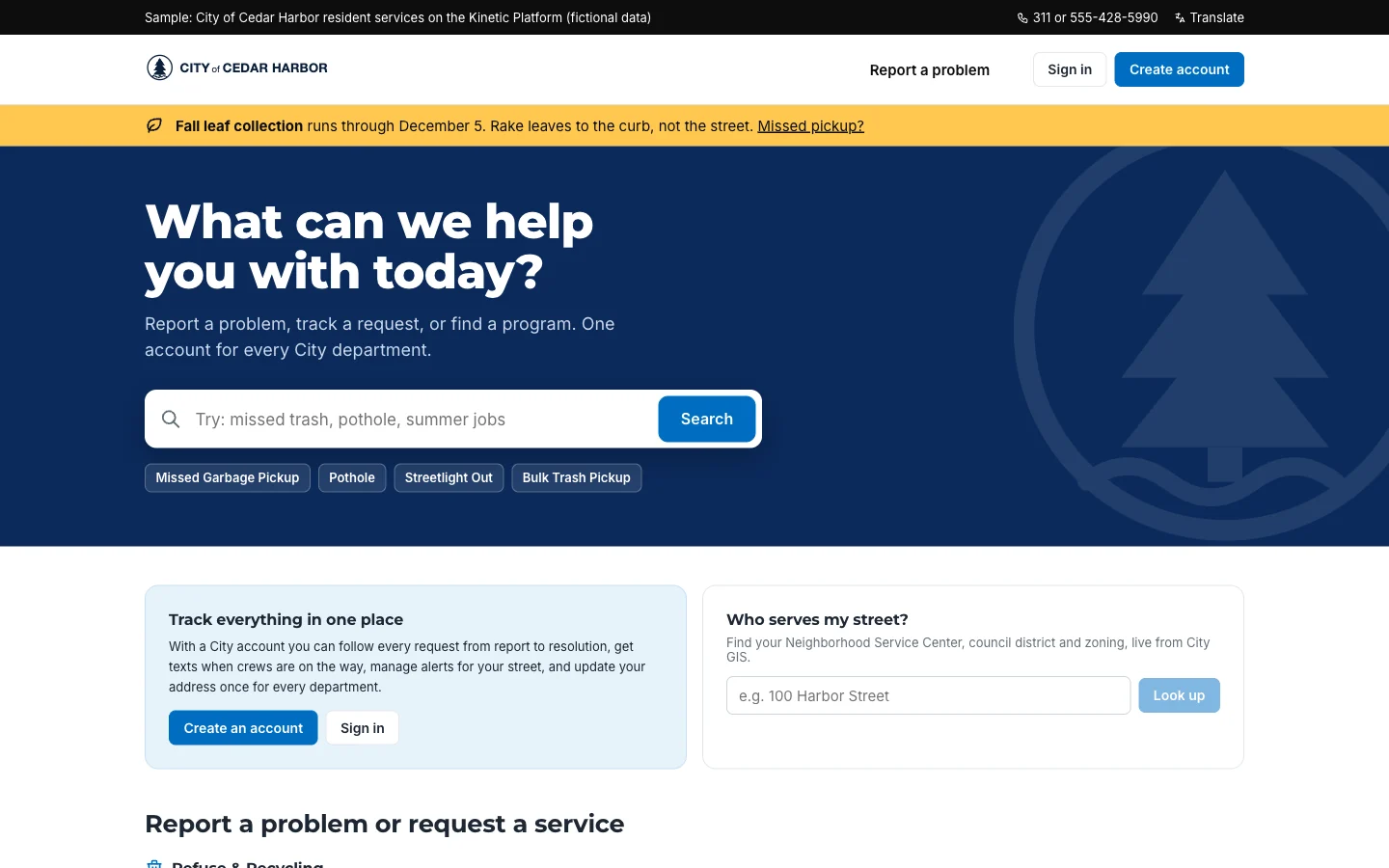
City of Cedar Harbor is a fictional city with a working Kinetic build: 28 service types in 11 categories, each routed by address to the department that owns it.

City of Cedar Harbor resident portal home page with the heading What can we help you with today, a service search box, quick links for missed garbage pickup, pothole, streetlight out and bulk trash pickup, and panels to create an account or look up who serves your street.
The resident front door: one search across every city service, no sign-in needed to start. City of Cedar Harbor · fictional organization, sample data
Experience layer
The portal and its forms. AI can draft the first version through MCP; your team decides which services appear and who sees them.
Workflow layer
Routing by service type and address, a service level per request, and escalation to a supervisor when one slips.
Integration layer
Matches the address to parcel and district data, then writes the request to the case or work order system that department uses.

Five portals customers build

Each serves one audience and connects to the systems that hold its records. Later portals start from the workflows and connections the first one built.

  • For clients

    Client onboarding portal

    A new client uploads documents and answers questions once. The workflow runs the KYC check, sends the contract and opens the account.

    Connects
    CRM, KYC and contract systems, ERP
    AI step
    Flags missing pages and drafts the follow-up request
  • For suppliers

    Vendor and supplier portal

    Suppliers update bank details and renew insurance certificates here, instead of emailing procurement.

    Connects
    ERP, procurement, supplier risk
    AI step
    Reads uploaded certificates and flags expired ones
  • For residents

    Constituent request portal

    A resident reports a missed pickup once. It reaches the sanitation work order queue with the address verified, and the resident can follow it.

    Connects
    Case, permitting, work order, GIS
    AI step
    Sorts free-text requests into service types
  • For members

    Customer and member self-service

    Members change an address or dispute a charge, and see live status from billing and support.

    Connects
    CRM, billing, ticketing
    AI step
    Drafts replies from live account data for staff to send
  • For applicants

    Program and grant management

    Applicants apply in one place. Program staff check eligibility, assign volunteers to shifts and approve awards from a single queue.

    Connects
    CRM, finance, scheduling
    AI step
    Pre-checks eligibility rules for staff to confirm

By industry: State and local government, Financial services, Healthcare, Managed service providers.

Two front doors in production

Franchise operations · Members

Gracie Barra

Schools on one platform
800+

Schools in many countries used to keep members in spreadsheets and paper logs. Now one platform handles membership across the network, and headquarters can see it.

Read the Gracie Barra case study

Defense · Candidates

U.S. Army INSCOM

Weekly recruiter admin time
25 → 12.5 hrs

Candidates used to print, fill in and return an 85-page PDF packet. A candidate portal with CAC sign-in, deployed in a DoD IL5 environment, replaced it and halved recruiter workload.

Read the INSCOM case study

Questions about Client Management

Answered by Kinetic Data. Last updated .

  • What is client management in Kinetic?

    It is the set of portals and workflows Kinetic builds for people outside your organization: clients, suppliers, members and residents. A request made in the portal updates the CRM or case record directly, so there is no side database to reconcile.

  • Is this a CRM?

    No. Your CRM keeps the client record. Kinetic builds the portal and the steps that reach past the CRM, such as a KYC check, a contract signature or a new account in the ERP.

  • Can we brand the portal and control who sees what?

    Yes. You build it in Kinetic, so you decide the branding and which services each group can see.

  • How long does a first portal take?

    That depends on how many systems and approvals are involved. Nothing has to be migrated first, because the records stay where they are. USDA built a proof of concept of its first self-service application on existing systems in four days.

  • Where does AI fit in a client portal?

    AI sorts incoming requests, checks uploaded documents for missing pages and drafts replies from live status. Staff approve anything that changes an account or a payment. You choose the model.

  • Can AI agents use the portal?

    Agents can create and read requests today through Kinetic's REST API or its MCP server, limited to what their user account is allowed to do. Native agent work exchange, where agents pick up and hand off work alongside people, is in development.

Map your first portal in two hours

Bring one client, supplier or resident process. We map the systems behind it and the portal Kinetic would put in front, and you leave with a written plan. The session is free.