Integration layer Available
An integration layer for your systems, your data and your AI agents
Kinetic's integration layer connects every portal and workflow to the systems and data you already run. Connections read and write ERP, HRIS, ITSM, CRM and data platforms, including systems inside your own network. If a system has an OpenAPI spec, Kinetic can connect to it. AI agents reach Kinetic the same way today, through its APIs and MCP server.
USDA Self-service provisioning on top of vSphere, Active Directory and its cloud platforms, with no migration first. Servers that took 3 weeks now take 30 minutes. Read the USDA case study

Point-to-point connections break every time a system changes
Most organizations connect systems one pair at a time. Then a ServiceNow upgrade breaks a dozen scripts nobody remembers writing.
AI agents add to the tangle, each with its own credentials and often its own export of the data. In Kinetic, a connection is built once and everything uses it.
What connects
Common systems customers connect
The rule is simple: if a system has an OpenAPI spec, Kinetic can connect to it. Databases, LDAP directories and systems behind your firewall connect too.
-
Service management
- ServiceNow
- BMC Remedy
- Cherwell
- Jira Service Management
-
Business applications
- Workday
- Oracle
- NetSuite
- Salesforce
-
Identity
- Active Directory
- LDAP
- Okta
- AWS IAM
-
Infrastructure
- VMware vSphere
- AWS
- Microsoft Azure
- Infoblox
-
Data
- Snowflake
- Databricks
- SQL Server
- PostgreSQL
- IBM Db2
-
Collaboration
- SharePoint
- Exchange
- Twilio
- SMTP email
Looking for a particular system? Search the integration library, or read the developer guide to building a connection.
Connect a system once, and every workflow can use it
Credentials are stored in Kinetic and managed by your administrators, not written into each workflow. The people building workflows say what should happen; the connection knows how.
- 01
A workflow step asks for something
Create a ticket in ServiceNow. Look up an employee in Workday. Disable an account in Active Directory.
- 02
The connection handles the system
Authentication, field mapping and error handling live in the connection, once.
- 03
The result comes back
The next step uses it, and the run history records what was sent and returned.
- 04
A system changes
When ServiceNow ships a new version or a legacy system is finally retired, you update that one connection in Kinetic, and every workflow and portal that depends on it keeps running untouched.
AI agents
Agents and people work from one backbone
An agent is another caller. It gets the access you grant, through the same MCP server and APIs your applications use, and the work it starts runs through the same workflow as everyone else's.
Today: MCP and the REST APIs Available
- An agent submits a request, and it goes through the same approvals as a person's.
- It reads the status of that work from the record people see.
- It starts a defined workflow or calls a Kinetic web API to look something up.
Next: native agent work exchange In development
Agents pick up work from Kinetic and hand it back as first-class participants, the way a person takes a task from a queue. Each piece of work keeps one owner, one status and one record, whoever is doing it.
Read where agent work is goingWhat AI can reach through this layer, and what it can't
AI can
- Start work and read status through MCP and the REST APIs.
- Use a system, as a workflow step, only through a connection that workflow already uses.
AI cannot
- Get broader access than you grant. An agent has the permissions of the account it uses.
- Skip the workflow. Work an agent starts gets the same approvals as a person's.
- Keep its own copy of your data. The systems of record stay the source.
One case, four connected systems
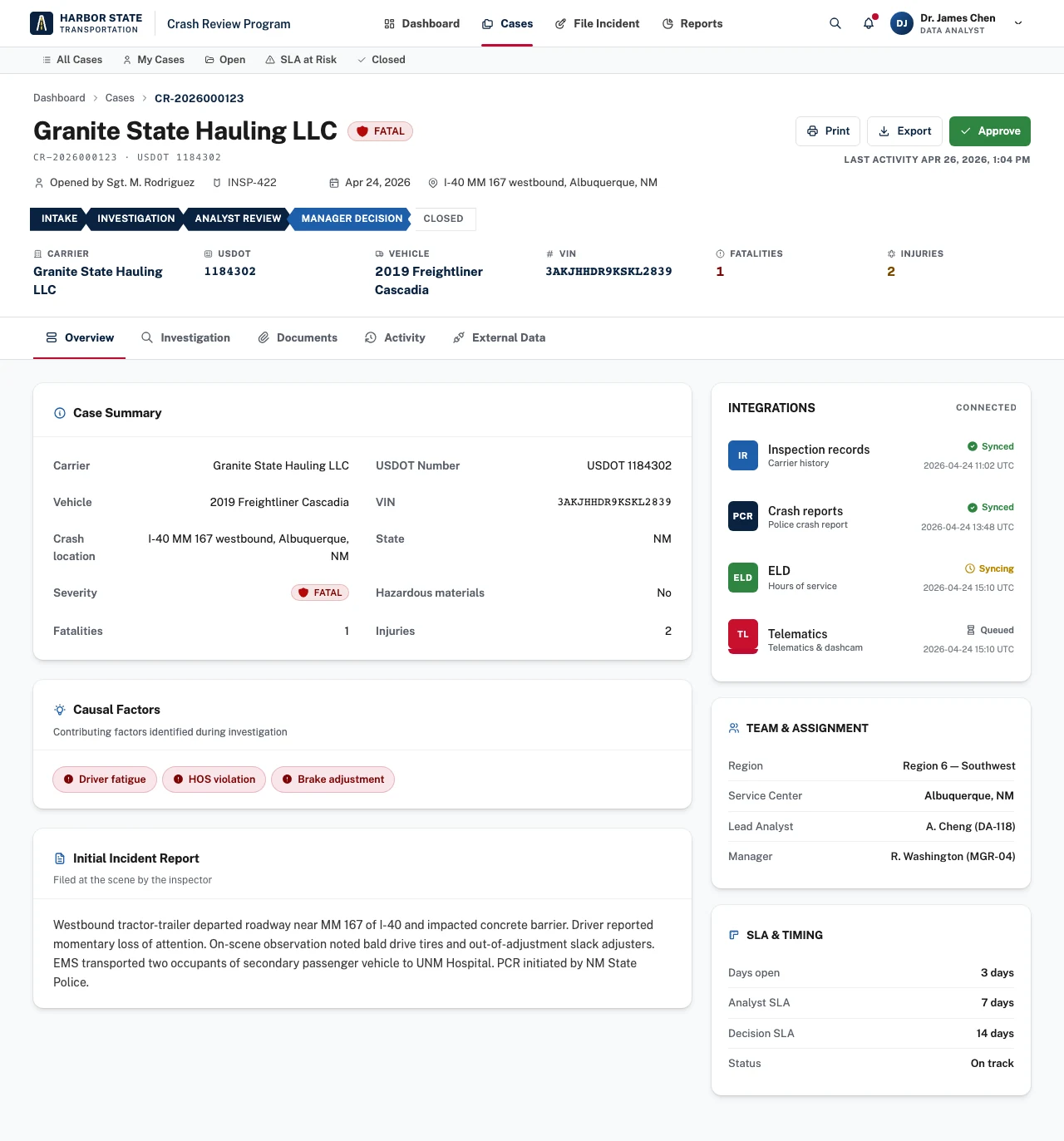
A crash review case pulls inspection records, police crash reports, hours-of-service data and telematics. The panel shows what each source returned and when.
What you can build next
Each connection you add is available to every application after it. These builds lean hardest on the connections you will already have.
-
Data to action
A threshold crossed in Snowflake or Databricks becomes a task, an approval and an update in the right system.
-
Service front door
One place for employees to ask, while ServiceNow, BMC and your other desks do the work behind it.
-
Legacy modernization
A current portal and workflow in front of a system you cannot retire yet, connected through its database or API.
Frequently asked questions
Answered by Kinetic Data. Last updated .
-
What is the Kinetic integration layer?
It is how Kinetic's portals and workflows read and write the systems you already run, including systems on your own network. It also includes the REST APIs and MCP server that applications and AI agents call.
-
What if our system isn't in the integration library?
If it has an OpenAPI spec, Kinetic can connect to it. Systems with a REST API but no spec connect through the generic REST connection, where you set the endpoint, authentication and field mapping once. Databases and LDAP directories connect directly.
-
Do our existing systems need to change?
No. Kinetic calls each system through its existing APIs, as any authorized client would. Nothing is installed in your system of record.
-
Can AI agents work with Kinetic today?
Yes, through the MCP server and the REST APIs, with the permissions of the account the agent uses. Work it starts goes through the same approvals as a person's. Native agent work exchange is in development.
-
Can Kinetic read from and write to our data warehouse?
Yes. Snowflake, Databricks and other warehouses connect the same way as any other system, so a query result can start a workflow and the decision a person approves can be written back for your analysts to see.
Bring one process. Leave with a plan to build it.
Two hours with our team, at no cost. Bring a list of the systems one process touches. We show how each would connect, where the gaps are, and send you a written plan afterward.