









The build platform for AI‑enabled business

Buy your systems. Build your advantage.

Kinetic is where large organizations build what their systems of record don't provide: the portal residents use, the onboarding that touches six systems, the approval an AI agent prepares and a manager signs. Your ERP, HR system and service desk stay as they are. Kinetic reads from them, writes to them and runs the work in between.

USDA Proof of concept on its existing systems in 4 days. Server provisioning went from three weeks to 30 minutes. Read the USDA story

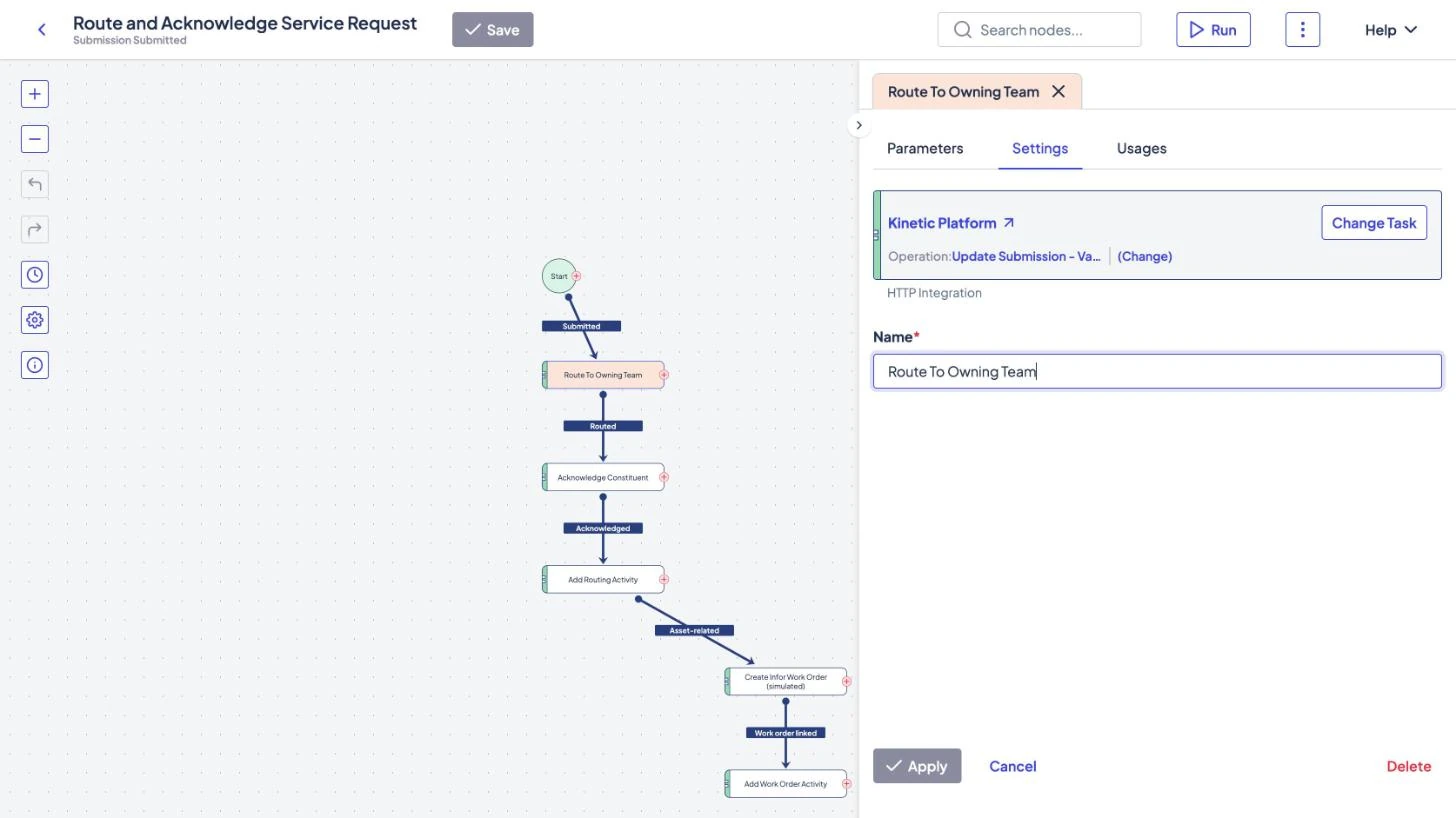
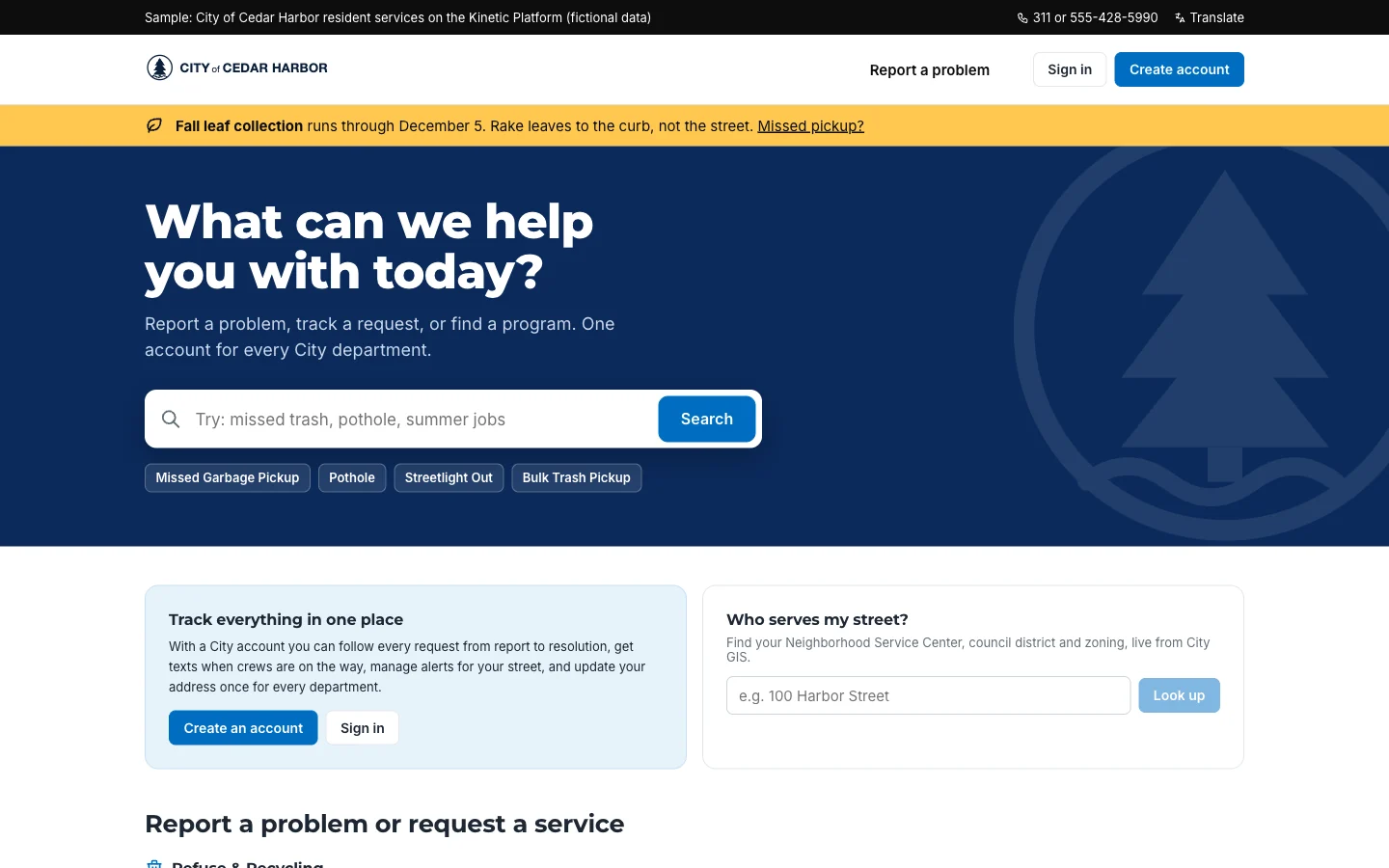
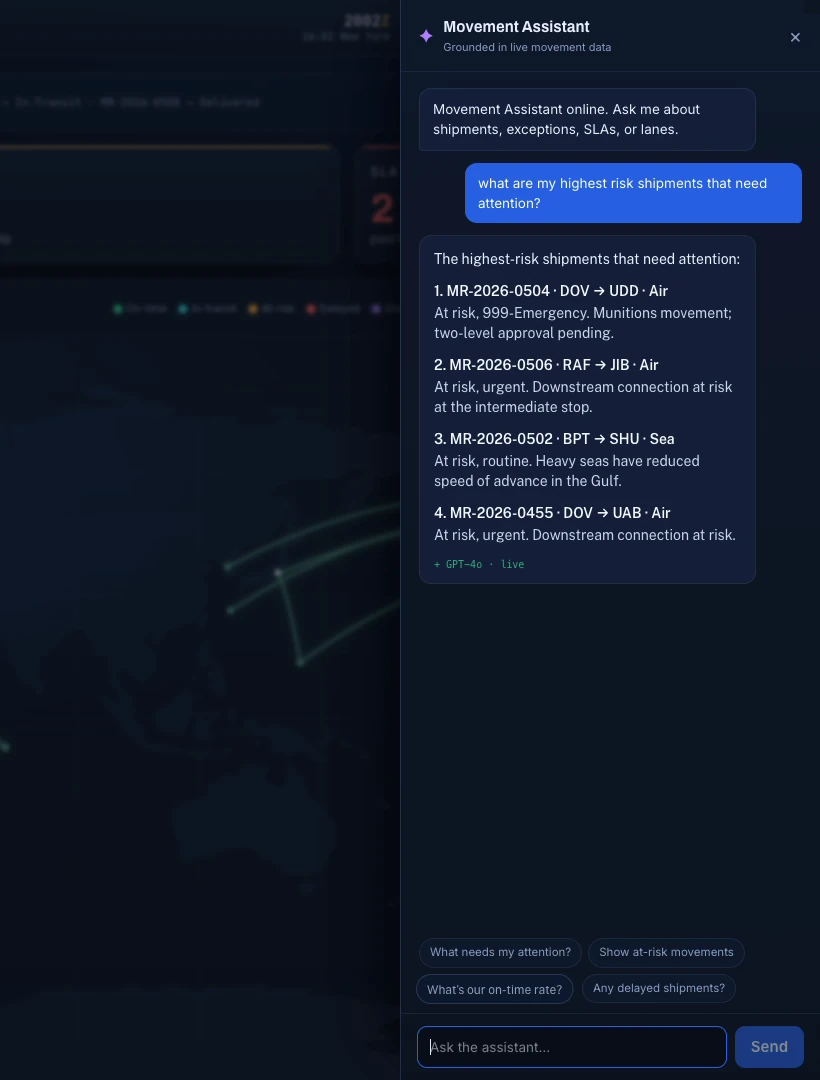
Three screens from Kinetic: the workflow builder where a team defines how a service request is routed, the resident portal the public uses (a fictional City of Cedar Harbor), and an AI assistant answering questions from live operational data (a fictional logistics command).
  • Build. Your team defines the workflow in Kinetic, or has AI draft it through MCP.
  • Use. Residents, clients and staff work in a portal built for them.
  • Ask. AI answers from live records inside the app, with people approving what matters.

Running in production at

  • USDA
  • U.S. Army INSCOM
  • Missile Defense Agency
  • Platform One
  • Hanford Mission Integration Solutions
  • Fairfax County Public Schools
  • Queens Public Library
  • GreenState Credit Union
  • Swisscom
  • Vattenfall
  • Gracie Barra
  • FMI
  • GLE
  • Curion
  • Aspire

The problem: shadow apps and agents

When systems of record are hard to use, people build around them

Ask how a request that crosses departments really gets done. You'll hear about a spreadsheet, a shared inbox and an app someone bought on a credit card. Now each team is adding AI agents too, every one with its own copy of the data. Nobody is doing anything wrong. There is simply no shared place to build.

How work gets done today

Every team builds its own workaround

  • Problem: Approvals for a request that touches three systems live in a spreadsheet
  • Problem: A department pays for an app that copies half the CRM
  • Problem: An AI agent works from its own export of last month's data
  • Problem: Status lives in someone's inbox, so people email to ask

The work gets done, but no one else can see it or build on it.

With Kinetic

Teams build on one framework instead

  • With Kinetic: Teams build the apps they need in one place
  • With Kinetic: Every request follows a process anyone can check
  • With Kinetic: People and AI agents work from the same record
  • With Kinetic: The ERP, HRIS and CRM stay the system of record

The shadow apps don't disappear. They move somewhere everyone can see them.

Buy the systems of record. Build what makes you different.

Nobody wins by writing their own payroll system. Plenty of organizations win on how they onboard a client or answer a resident. Buy the first kind of software and keep it close to standard. Build the second kind on Kinetic.

  • Buy

    Commodity systems

    Everyone needs them. Writing your own payroll system is a cost, not an advantage.

    • ERP and finance
    • HRIS and payroll
    • ITSM and service desk
    • CRM
    • Data warehouse or lake
    • Foundation AI models
  • Build

    The work that sets you apart

    How you onboard a client, answer a resident or approve a contract. Nobody sells that off the shelf.

    • The client or resident portal
    • The process that spans five systems
    • The agent-assisted decision
    • The app your team will actually use
  • Kinetic

    The framework you build on

    Bought once. Your second application reuses most of what the first one built.

    • Portals, forms and workflows
    • AI that drafts the build through MCP
    • People and agents in the same process
    • Any model, including one you host

How it works

Three layers between your people and your systems

People see the experience layer. The workflow layer moves the work, and the integration layer talks to your systems and data. AI drafts the first two through Kinetic's MCP server. Every application uses all three, which is why the second one goes faster than the first.

Kinetic architecture: people and AI agents work through three layers: the Experience layer, the Workflow layer and the Integration layer. Those layers connect to the systems and data the organization already runs. Native agent work exchange in the Integration layer is in development.

Native agent work exchange. Agents pick up and hand off work in Kinetic as participants in the process, the same way people do. Agents already start work today through MCP and the REST API.

In development

The systems and data you already own · stay in place

  • ERP
  • HRIS
  • ITSM
  • CRM
  • Case and permitting
  • Data warehouse and lake

What AI does here

  • Builds portals, forms and workflows through Kinetic's MCP server, for a person to review.
  • Does one job inside a running workflow: sorting a request, pulling fields from a document, drafting a reply.
  • Creates records and starts workflows through MCP, within the permissions of the person using it.

What AI does not do here

  • Keep a second copy of your system-of-record data.
  • Decide how a process runs. The workflow runs the same way every time.
  • Sign off on consequential steps. A person does.

Start with one application. The next one is already half built.

Most customers start in one of three places. The second application reuses the forms, connections and approval rules of the first.

For BI and data leaders

Turn warehouse data into decisions and action

You've put real money into Snowflake or Databricks, and the dashboards are good. Then someone still opens three systems and chases two people to act on what they show. Kinetic turns a warehouse signal into a workflow that ends with the system of record updated.

See data to action
  1. 01 Signal A model in the warehouse flags a supplier whose on-time rate dropped 12 points this quarter.
  2. 02 Decision Kinetic opens a review. AI drafts the case with the supporting rows; a category manager decides.
  3. 03 Action The decision updates the supplier record in the ERP. Nobody retypes it.
  4. 04 Feedback The outcome goes back to the warehouse, so next quarter's model knows what happened.

Two agencies that built on what they had

Neither one migrated a system to get these numbers.

Federal government

U.S. Department of Agriculture

Server provisioning
3 weeks → 30 min
Proof of concept
4 days

USDA's National Information Technology Center built self-service provisioning on top of vSphere, Active Directory and its cloud platforms, with no migration. More than 75% of its business and service functions now run as automated requests.

Read the USDA case study

Defense

Missile Defense Agency

Faster process completion
50–65%
Annual cost impact
$1.1–1.6M

MDA put routing and approvals for more than 9,000 users on Kinetic, connected to its existing systems through their APIs. Approval routing that took five days now takes two.

Read the MDA case study

A REST API, an MCP server, and documentation that matches

Engineers will check whether this site holds up, and they should. Everything you build in Kinetic is reachable through the REST API. Configuration exports for review and version control. The MCP server lets an AI assistant build in your space with your permissions, not more.

Create a request through the Kinetic REST API
# Submit a new-hire request. Kinetic runs the onboarding workflow# across HRIS, identity and ITSM.curl -X POST -u "$KINETIC_USER:$KINETIC_PASSWORD" \  "https://<your-server>/app/api/v1/kapps/services/forms/new-hire/submissions?completed=true" \  -H "Content-Type: application/json" \  -d '{    "values": {      "Employee Name": "Jordan Lee",      "Start Date": "2026-11-02",      "Department": "Finance"    }  }'

Questions executives ask

Answered by Kinetic Data. Last updated .

  • What does Kinetic Data do?

    We make the software large organizations use to build their own applications on top of the systems they already run. A typical first build is a portal or a cross-system process, such as employee onboarding that touches HR, identity and the service desk. AI drafts much of the build; Kinetic runs it.

  • Do we have to replace anything?

    No. Kinetic reads from and writes to your ERP, HRIS, ITSM and CRM through connectors and APIs, and those systems keep the records. If you replace one of them later, you reconnect it. The people using the portal never see the change.

  • Is this low-code?

    There are low-code tools in Kinetic, but the difference is where your data lives. Most low-code platforms want to become the system of record. Kinetic stays out of that job, which is why customers can modernize one process at a time without a migration project.

  • Where does AI fit?

    In two places. Through Kinetic's MCP server, an AI assistant builds forms, portals and workflows for a person to review, and it can also create records and start workflows within that person's permissions. Inside a running workflow, AI is one step: it classifies, extracts or drafts, and the workflow decides what happens next.

  • Which AI models can we use?

    Kinetic doesn't ship a model. Customers use Anthropic Claude, Amazon Bedrock, Azure OpenAI, models they host themselves, or any assistant that supports MCP. That keeps model choice and data handling in your hands, including in air-gapped environments.

  • What are shadow apps and agents?

    They're the spreadsheets, departmental apps and AI tools teams adopt when the systems of record are too hard to use. They work, for a while, but each one keeps its own data and its own idea of status. Kinetic gives teams a place to build the same things where everyone can see them.

Bring one process. Leave with a plan to build it.

Two hours with our team, at no cost. Bring one process that crosses your systems. We map it with you, show what Kinetic would build, and send you a written plan afterward.