Workflow layer Available

Workflow orchestration where AI builds the process and Kinetic runs it

Kinetic's workflow layer runs the processes that cross your systems: approvals, deadlines, escalations and the updates to your ERP, HRIS and ITSM. AI drafts the workflow through MCP and works inside it as a step that reads and summarizes. The published workflow takes the same path every time, at whatever volume you run.

Real screen A case workflow in the Kinetic workflow builder, with priority routing, SLA timers, escalation and an AI recommendation step.

The Kinetic workflow builder showing a Case Lifecycle Orchestrator workflow. After intake classification the request branches by priority into paths that page an on-call manager, assign a senior agent, wait on five- and fifteen-minute SLA timers and escalate to a VP. The paths merge, run a compliance check, branch again by category through steps including an AI recommendation, then finish with a satisfaction survey, an analytics update and close.

Real work crosses systems, and stalls between them

Onboarding touches HR, IT, facilities and payroll. Each system does its own part well, and nothing owns the gaps between them.

  • Handoffs by email

    HR forwards the onboarding thread to IT. If the message is missed, the laptop is late.

  • Approvals in inboxes

    A purchase request waits four days for a signature because the approver never knew it was waiting.

  • Status nobody can see

    The requester calls to ask where things stand. The answer is in three systems and someone's notes.

Built with AI through MCP

Describe the process, and AI drafts it inside Kinetic

Through Kinetic's generally available MCP (Model Context Protocol) server, the assistant drafts the workflow from forms and connectors you already have.

The same server can start workflows within the signed-in user's permissions. Once started, a workflow follows its published steps.

  1. 01 Describe the process Name the steps, the approvers, the deadlines and the systems: “IT approves software over $500, finance approves over $5,000, then create the order in the ERP.”
  2. 02 AI drafts the workflow The assistant builds it through the MCP server from forms, connections and routines already in the space.
  3. 03 Your team reviews it Someone checks each branch in the workflow builder and fixes what is wrong.
  4. 04 Kinetic runs it Once published, it takes the same path for every matching request.

The workflow moves the work, so people stop chasing it

Every Kinetic workflow knows who acts next, how long they have and what happens if they don't.

  • Approvals

    One or several levels, routed by role or amount, with delegation when an approver is on leave.

  • Deadlines and escalation

    A timer on any step. When it runs out, the request moves to the next person or team.

  • Parallel paths

    Badge, laptop and payroll setup all start the moment HR confirms a start date, and the workflow waits for every one of them to finish before it marks the new hire ready for day one.

  • Exceptions

    When a system rejects an update, the workflow retries or puts the case in a review queue, where someone can see it.

AI as a step

AI reads the documents, and the workflow decides what happens next

Inside a workflow, AI is a step with one job. You pick the model and can swap it later without rebuilding the process.

It also keeps costs down. Every model call is billed, while a routing rule costs almost nothing to run again. Calling a model only where judgment is needed ties model spend to the steps that earn it.

  • AI step

    Classify

    Sort an incoming request by type and urgency.

  • AI step

    Extract

    Pull the invoice number and amount out of a PDF.

  • AI step

    Summarize

    Give an approver the short version of a forty-page case file.

  • AI step

    Draft

    Write the reply a caseworker edits and sends.

Every workflow, what starts it and how each run went

A workflow starts when a form is submitted or updated, or when a system or AI agent calls a Kinetic web API. Each run is recorded step by step: which system was called, what came back, who approved and when.

Kinetic's admin view of a case management application: three forms and 26 workflows. Workflows are grouped by the event that starts them, such as submission created, submitted or updated, plus Web API workflows with their endpoint paths. Each row shows whether the workflow is active and when it was last updated.
A case management app with 26 workflows, grouped by the event that starts each one.

Defense

Missile Defense Agency

MDA's approvals used to pass by hand from one office to the next. Its Kinetic workflows now serve more than 9,000 users on the agency's existing core systems, and routing that took five days takes about two.

Read the MDA case study
Approval routing
5 days → 2
Faster process completion
50–65%
Fewer exceptions
40%
Daily users
9,000+

What AI decides in a workflow, and what it doesn't

AI does

  • Draft workflows through MCP for your team to review.
  • Read, sort and summarize as a step in a running workflow.
  • Start a workflow through MCP, with the signed-in user's permissions.

AI does not

  • Choose the route at run time. The published workflow does.
  • Approve the steps you assign to a named person.
  • Promote its own drafts to production. A person exports and imports the approved version.

The workflow builder, with a real branch

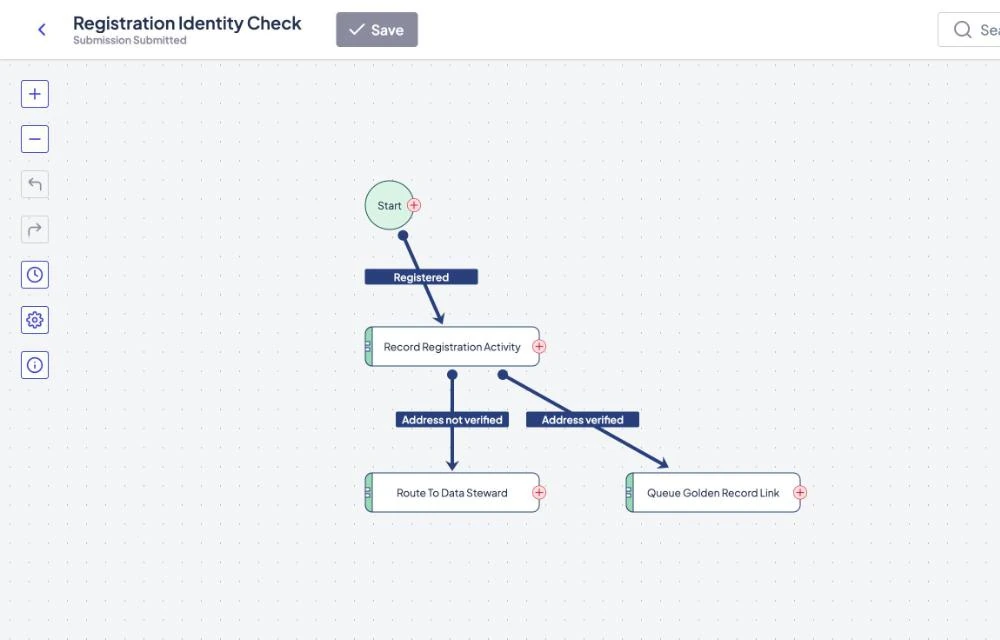
This workflow checks whether a new resident's address was verified. Verified registrations queue a link to the existing record; the rest go to a data steward. A person reading it can follow every path.

The Kinetic workflow builder showing a Registration Identity Check workflow: Start, then Record Registration Activity, which branches on Address not verified to Route To Data Steward and on Address verified to Queue Golden Record Link.
A workflow that branches on whether a resident's address was verified. The same steps run the same way for every registration. City of Cedar Harbor · fictional organization, sample data

Frequently asked questions

Answered by Kinetic Data. Last updated .

  • What is the Kinetic workflow layer?

    The part of Kinetic that moves a request from submitted to done. It routes work, waits for approvals, escalates what stalls and updates your systems of record. Every run is recorded, so you can trace any request.

  • Can AI build a workflow in Kinetic?

    Yes. Through the generally available MCP server, an assistant such as Claude drafts workflows from a plain-language description. Your team reviews the draft in the workflow builder before it runs.

  • Can AI start a workflow through MCP?

    Yes. The MCP server can reach any Kinetic API the signed-in user is allowed to use, so an assistant can create a record or start a workflow for that user. Once started, the workflow follows its published steps; the assistant does not reroute it.

  • Why use AI as a step instead of letting an agent run the whole process?

    A purchase approval should follow the same rules on Tuesday as on Monday. Give AI the steps that need judgment, such as reading a document, and the rest of the process stays predictable and cheap to run.

Bring one process. Leave with a plan to build it.

Two hours with our team, at no cost. Bring the process that stalls most often. We map who approves what and where AI should do the reading, and send you a written plan afterward.