Plenty of business processes still run on paper, email and retyping the same data into two systems. Everyone agrees they should be fixed. What stops most organizations is the memory of the last big platform project: the budget, the delays, the year of disruption. This paper looks at where that risk comes from, and at four ways to get the benefits of digital transformation while taking on much less of it.
Everybody is doing it, and most are not doing it well
Interest in the term took off in early 2016, judging by Google search trends, and it has not gone away since. The Enterprisers Project gives a definition most people would accept: “Digital transformation is the integration of digital technology into all areas of a business, fundamentally changing how you operate and deliver value to customers. It’s also a cultural change that requires organizations to continually challenge the status quo, experiment, and get comfortable with failure.”
Organizations have been adopting digital tools for decades, of course. Word processors replaced typewriters, spreadsheets replaced printing calculators, and email replaced a good share of actual conversations.
Even so, a surprising number of business processes are still paper-based or manual, or at best need the same data typed into several systems. The point of digital transformation is to find those processes, one by one, and apply technology so they run faster and cost less.
The definition above also describes a change in mindset. The people who know a process best are encouraged to question how it works and look for a better way. “We’ve always done it this way” used to be a reason to leave things alone. In an organization that takes transformation seriously, it is the signal that something needs another look.
Why organizations transform
The benefits are well documented, and most of them follow from taking manual work out of everyday processes:
- Efficiency and lower cost. Automated processes take less time and fewer handoffs, and people spend less of their day on repetitive data entry and more on work that needs their judgment.
- Better experiences for customers, partners and employees, who can request what they need and see where it stands without chasing anyone.
- Agility. An organization that can change one process quickly can keep improving existing processes and stand up new ones without a major project each time.
- Collaboration across teams, departments, partners and business units, because work moves through a shared process instead of an inbox.
- Insight. Digital processes collect data as they run, which makes analysis possible where there used to be none.
- Governance and compliance. Consistent processes are easier to audit and make enterprise risk easier to manage.
- Competitiveness, and in some cases better sustainability, financial performance and workplace safety.
With that many reasons to start, why do so many organizations hesitate? Mostly because of cost and risk.
Why digital transformation feels risky
Most organizations now buy their systems of record: the ERP, the HR system, the IT service management tool, the CRM. The risk sits in what they build to connect those systems and fit them to the way the organization actually works. That building can go wrong in four ways. Financial risk is spending more than planned, or spending most of it before anything is in use. Execution risk is the project running late, or changing the business faster than people can absorb. Adoption risk is finishing the system and watching people work around it. Technical risk is picking the wrong tool, or finding that it will not connect to what you already run.
The original version of this paper identified five specific risks, and they still hold. We have added a sixth, low adoption, which matters more now that any department can buy a SaaS app or ask an AI tool to build one. The table sorts each risk into one of the four kinds and points to the part of this paper that answers it.
| Risk | Kind | What it looks like | Answer in this paper |
|---|---|---|---|
| Cost and time overruns | Financial | A multi-year platform replacement that runs over budget and delivers less than planned | 1. Build on what you have |
| Business disruption | Execution | Dropped requests and frustrated employees and customers while everything changes at once | 2. Change in small steps |
| The wrong technology | Technical | A full replacement bought when a smaller change would have done the job | 3. Judge tools by the experience they create |
| Culture | Adoption | Teams solving the same problem with different tools, nobody in charge, resistance to change | 4. Let process owners build |
| Digital skills | Execution | The people who know the process best are not the people who can build software | 4. Let process owners build |
| Low adoption | Adoption | The new system goes live, and people keep their spreadsheets or buy and build their own apps | 3. Judge tools by the experience they create |
Big platform projects overrun
The largest single concern is implementation risk. Installing an enterprise-wide platform for IT service management, ERP, human resources, finance or supply chain is usually a project measured in years and millions of dollars. McKinsey’s research on large IT projects (published in 2012, with the University of Oxford) found that “on average, large IT projects run 45 percent over budget and 7 percent over time, while delivering 56 percent less value than predicted.”
Not every transformation needs a new core platform. Sometimes, though, there is no way around one:
- the organization has outgrown its current system
- an acquisition has left duplicate applications that need to be consolidated
- the vendor no longer supports the platform
Legacy systems make this harder. They are expensive to maintain, and replacing them can take years and millions of dollars, which is usually more expensive still. Many organizations end up paying for both: the old system they cannot retire and the new one that is not finished.
Disruption to the business
Every process change means people will do their work differently. That is the purpose of the change, and it can be a very good thing. Managed badly, it means confusion, requests that fall through the cracks, and frustrated employees and sometimes customers.
Choosing the wrong technology
A third risk, described on the Altoros blog, is adopting the wrong technology or the wrong use case. There are times when a whole system has to be replaced. Often, though, an incremental change would be enough. And even when a new platform is the right call, a focused tool may still be the better fit for a specific need.
Culture and skills
Altoros also names organizational culture as a risk. Collaboration across departments is hard in a large organization, so it is common to find different teams using or building different tools to solve the same problem.
Someone has to own the transformation. If it is everyone’s job, in practice it is no one’s. Bureaucratic inertia and ordinary resistance to change have to be overcome too, especially when people suspect that their routines, or their jobs, are at stake. Occasional change is stressful enough. The near-constant change that transformation asks for creates even more uncertainty.
Finally, Accenture lists a lack of digital skills among the top five obstacles to transformation succeeding. Being comfortable using digital tools is different from knowing how to build them. The people with the deepest knowledge of how accounting, procurement or customer service actually work are rarely the people with deep technical skills.
People work around the new system
A project can finish on time and on budget and still fail, because people go on using email and spreadsheets. When the official process is harder than the workaround, the workaround wins. Today the workaround is often an app a department bought on a credit card, or one someone built with an AI assistant over a weekend. Each holds its own copy of the data and runs outside any shared process. The organization ends up with more systems to connect than it had before the project started.
Four ways to take the risk down
The risks are real. Ignoring transformation is riskier. Blockbuster Video is the well-known example of a business that did not adapt, and there are thousands of quieter stories like it. Organizations that are slow to change watch more forward-thinking competitors take their margins and their customers. Those that transform well bring out new services faster and lower their costs sooner, and the laggards are left to catch up, get acquired or disappear.
The four approaches below rest on one decision. Buy the systems of record, and build the processes that set your organization apart on top of them, one small slice at a time. A slice is one part of one process, such as a request form, an approval or a handoff between two systems. Building in slices changes each of the four kinds of risk:
- Financial. You pay for one slice before you commit to the next, so the money at stake at any moment is the cost of the slice in progress. Kinetic has no per-user fees, so opening a finished slice to more people does not mean buying more licenses (how Kinetic is priced).
- Execution. A slice is small enough to test with real users and fix in days. If priorities change, you change the next slice instead of defending a plan written a year ago.
- Adoption. The people who do the work help shape each slice and see their own requests move through it, which leaves them less reason to keep a workaround.
- Technical. The data stays in the systems of record. Each slice connects only to the systems it needs, so an integration problem shows up early, while it is still small.
USDA’s National Information Technology Center worked this way. It kept vSphere, Active Directory and its cloud platforms as they were and built one self-service provisioning process on top of them in Kinetic. The proof of concept took four days, and provisioning fell from three weeks to 30 minutes. The USDA case study describes how.
1. Build on the systems you have
Large enterprise software projects go over budget and over time because of their scope. A company-wide rip-and-replace project can touch hundreds of separate business processes and change how thousands of people do their jobs. Managing that much change at once is an enormous logistical problem.
The alternative is to keep the systems you have and build on top of them. A modest investment in new technology, placed in front of your existing ERP and HR systems, gets more value out of them and extends their useful life. The systems of record keep the data. The new layer gives people better screens and connects the work across systems.
This lowers risk in three ways. Software and services cost much less. Fewer tasks and roles change at once. And the payback comes far sooner, because the first improved process can go live in weeks instead of at the end of a multi-year program. We made the longer case for this approach in why building on existing systems beats rip and replace.
2. Change in small steps
Building on what you have also keeps disruption low, because it allows a build, test and improve cycle in place of one sudden, massive change.
A process or service owner automates one part of a workflow, tests it with real users, improves it and puts it live. Then they move on to the next part. Each step is a small, visible win, and those wins build support for the change.
Step 1
Automate one part
Pick a single step, such as the request form or the first approval.
Step 2
Test it
Run it with the people who do the work, on real requests.
Step 3
Improve it
Fix what they found. The change is small, so the fix is too.
Step 4
Put it live, then repeat
Move to the next step in the process, or the next process.
Over time, automating hundreds of workflows across the organization can produce efficiency gains of the same order as a big-bang system replacement. The cost is far lower and, more important, so is the disruption, because the change happens gradually and from the bottom up instead of all at once and from the top down.
3. Judge technology by the experience it creates
New technology sits at the center of any transformation, and the right choices raise the odds of success. Three questions help.
Do you need to replace a platform at all? Before committing to a large, enterprise-wide replacement, ask whether a new front end built on top of your existing systems of record would reach the same goal at lower cost and risk. We describe that pattern in more detail in separating the system of engagement from the system of record.
Will it improve the experience for everyone the change affects? New software should work better for three groups:
- End users (employees, contractors, suppliers and customers), who should find screens that are familiar, convenient and quick to complete.
- IT staff, who should be able to hand some building work to the process owners closest to it while keeping security and reliability under their control.
- Process owners, who need to see where every request is and who owns it.
How easily does it connect to what you already run? Take a self-service portal. One front door should connect to IT service management, HR, finance, facilities and other systems, so that people can request anything from one place and never need to know which system handles it.
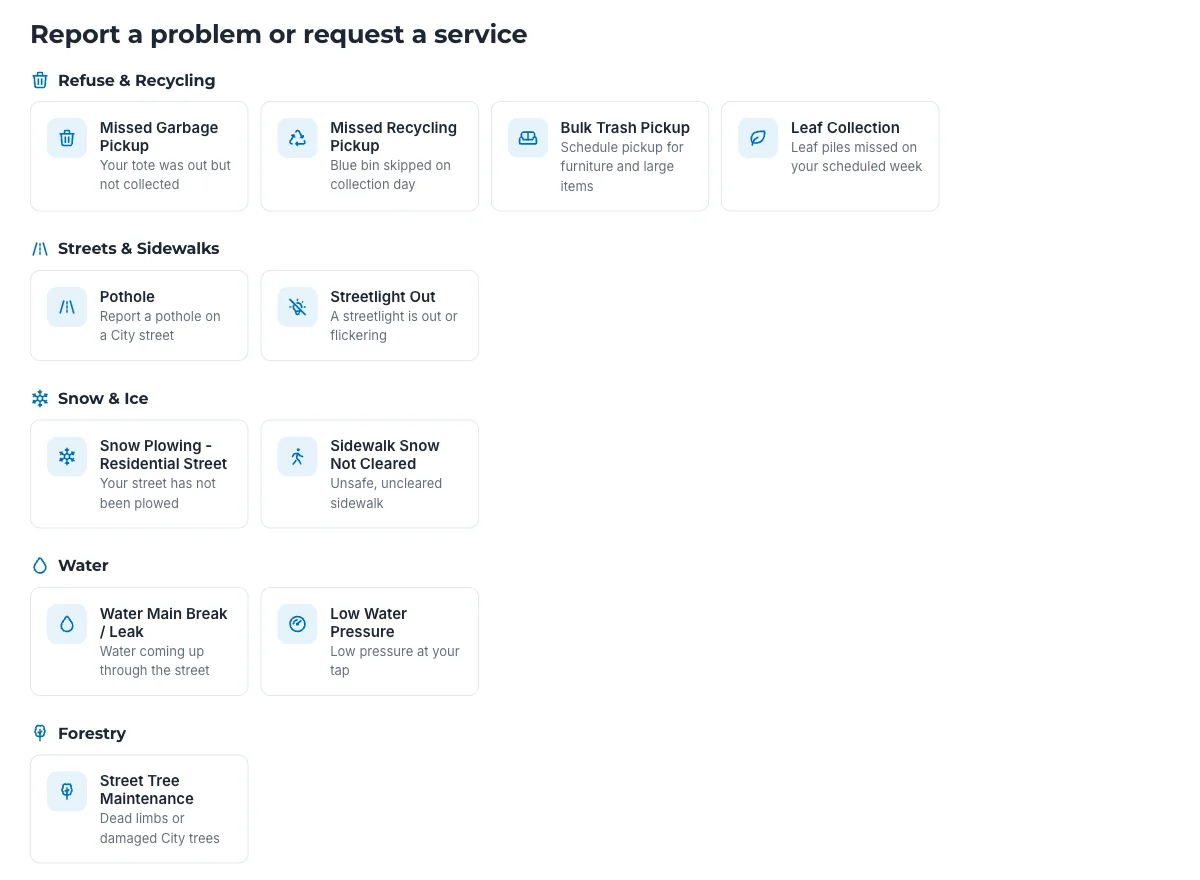
4. Let process owners build, inside limits IT sets
The cultural side of transformation needs technology that spreads the ability to automate processes across the organization, and still runs on one central platform that keeps the experience consistent and the data protected.
When the original paper was written, the answer was a low-code platform: process owners and subject-matter experts design forms and workflows for their own departments without writing code, which takes load off IT and speeds the whole effort up. That still holds. Today AI does more of the building. In Kinetic, an AI assistant connected through MCP can draft forms, portals and workflows from a plain description, and the process owner reviews and adjusts the result. AI builds through MCP, and can create records and start workflows within the user’s permissions. Once a workflow is live, it runs the same way every time.
From a management point of view, this lets employees change their own operations from the bottom up. People rarely resist a change they helped create. It only works, though, if IT can set the boundaries: who can build what, which data each person can see, and how the network stays secure.
Watch for three traps when you choose a platform for this.
Trap 1
All-in-one suites
A suite that does everything is appealing, but installing one across the enterprise brings back the cost and disruption of a full replacement. A platform that improves your existing systems step by step reaches a similar result with far less risk.
Trap 2
Tools that make you change the process
The less code a tool allows, the less flexible it tends to be. Very simple tools often force a choice between reshaping the business to fit the tool and keeping manual steps the tool cannot handle.
Trap 3
Proprietary languages
Some platforms need their own scripting language to adapt them. You still need developers, and now they have to learn and keep current with a skill nobody else uses, which cancels much of the point.
The safer choice is a platform that works with the enterprise systems you already have, supports small improvements over time, and lets IT work under the hood in standard languages. Process owners should be able to build and test workflows in a safe environment where they cannot accidentally delete or corrupt production data. IT acts like a referee, stepping in only when it is needed.
What to look for in a platform
Many workflow platforms are marketed for enterprise transformation. The one to choose is the one you can put in place in a reasonable time, that supports and improves the way you already work, and that gives business users simple tools while leaving IT full control in code. Use the seven requirements below as a checklist when you evaluate options, including the system you have today.
| Requirement | What to check |
|---|---|
| Scale | Grows with your needs on commodity hardware, has high availability built in with no single point of failure, and can be updated without taking it offline. |
| Flexible security | Rules based on roles and functions, not just groups. Extra conditions, such as a form that is open only during business hours. Sign-in options that match your environment, such as SSO through SAML or OIDC, CAC/PIV and Active Directory. |
| Low code and pro code | Process owners design forms, build workflows and change anything that changes often. IT builds integrations and the overall look of the portal, and has full access to the APIs. |
| Your own user interface | Complete control over branding and the end-user experience. IT sets standards in a front-end framework, and they apply automatically to everything business users build. |
| Open integration | Connects portals and workflows to almost any system, on premises or in the cloud, to improve those systems instead of replacing them. Ready-made connectors for common systems, plus the ability for IT to build its own. |
| Distributed management | Business teams own and administer their own areas while IT keeps overall control through rules-based security. The vendor supports you, but you do not depend on it for routine changes. |
| Internationalization | Business users can translate forms and portals into any language and localize them. |
Kinetic was designed around these requirements. Security, for example, is defined once as named rules and reused across every portal, form and record, so a process owner building a new form picks from rules IT has already approved.
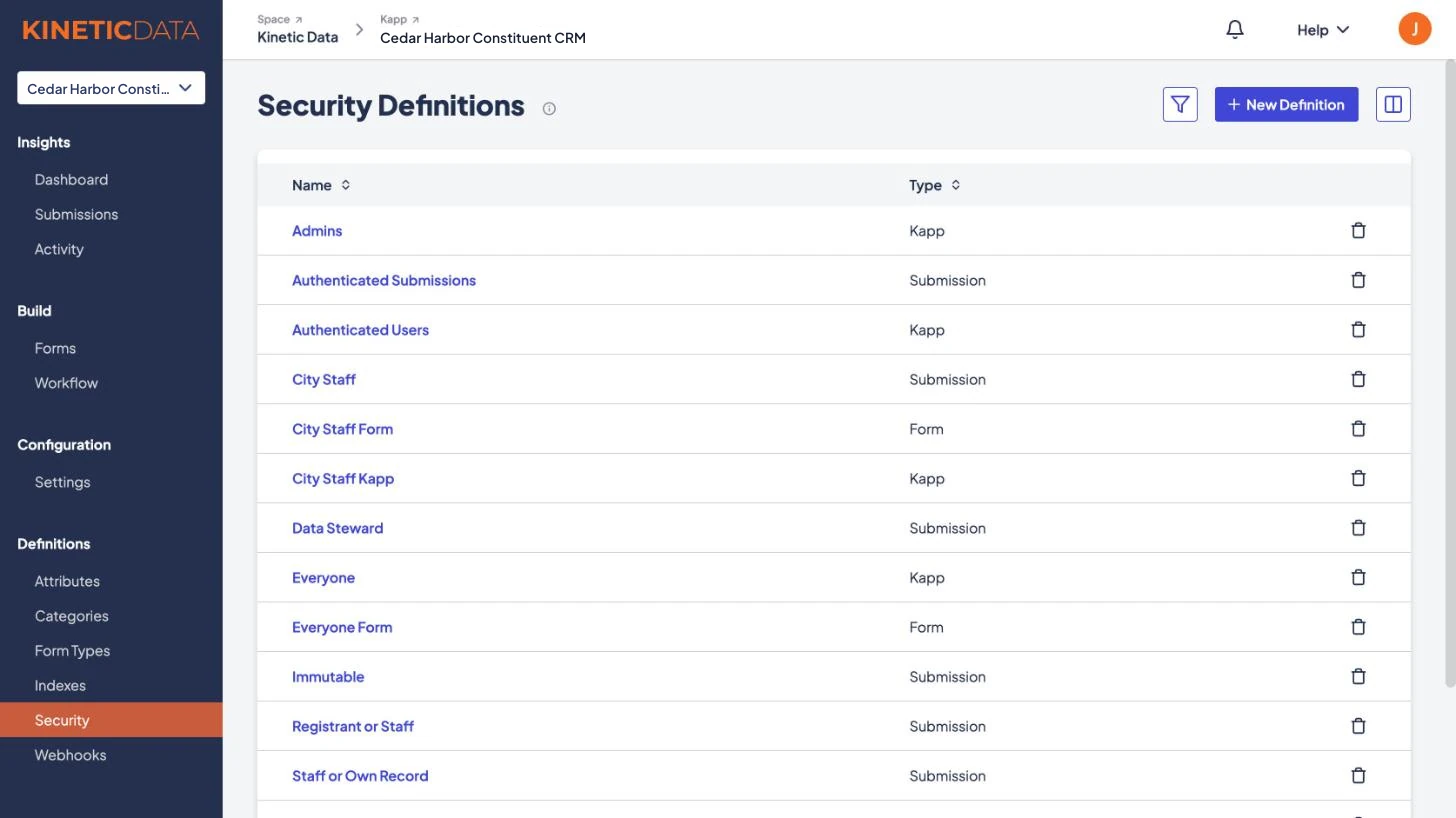
The same platform runs in demanding environments. Kinetic is available as a Kinetic-hosted cloud service or installed and managed by the customer, including air-gapped networks, and it runs with ATOs in DoD IL4 and IL5 customer environments. Details are on the security and deployment page.
Where to start
A better path to transformation has three steps, and each one draws on a different group of people.
Assess what you have
Led by your core IT and business team
Pick a few starting processes
Led by the internal experts who run those processes
Learn from people who have done it
With outside experts who have built in several organizations
Assess what you have
Start by evaluating your current technology. Does it let process owners make changes themselves? Does it give everyone involved a good experience? Does it meet the seven requirements above? Score your current system against that table, compare it with the alternatives you are considering, and note the gaps. Adapt the criteria to your own priorities.
Pick a few starting processes
Next, talk to the process experts in different departments about how their work flows, and look for the easy wins. You do not need a complete list yet, only a few processes that would clearly benefit from automation and can help justify the investment. Keep them simple and common: ordering equipment, onboarding a new employee, setting up a new supplier.
Learn from people who have done it
Before you commit, talk to people who have built these processes in several organizations. They can help you avoid buying technology that does not quite fit, and building custom internal systems that are expensive to maintain.
That is what a working session with our team is for. It is free, takes two hours, maps one of your starting processes and ends with a written plan you can use whatever you decide.
Sources
- Google Trends, search interest in “digital transformation,” United States: trends.google.com
- The Enterprisers Project, “What is digital transformation?”: enterprisersproject.com/what-is-digital-transformation
- CNBC, “5 proven benefits of digital transformation”: cnbc.com
- IMPACT, “Benefits of digital transformation for sales professionals”: impactbnd.com
- McKinsey and Company with the University of Oxford, “Delivering large-scale IT projects on time, on budget, and on value” (2012): mckinsey.com
- Altoros, “Digital transformation: what are the challenges and where to start?”: altoros.com
- Digital Adoption, “Digital transformation pros and cons”: digital-adoption.com
- Kinetic Data, Why embrace and extend beats rip and replace
- Kinetic Data, System of engagement and request management
- Kinetic Data, USDA case study: server provisioning from three weeks to 30 minutes