Abstract
Most enterprises already automate some business processes. They usually do it in one of three ways: by extending their IT service management system, by buying a specialized business process automation (BPA) tool, or by building automated workflows as part of a business process management (BPM) program.
Each of those approaches is expensive enough that it gets used only on core processes. Yet every large organization runs hundreds, sometimes thousands, of smaller processes that would benefit from automation and are judged too small to justify a development project.
Kinetic Task 3.0 is a workflow engine that is configured rather than programmed and can connect to almost any application database. That makes it practical to automate those smaller processes in IT, HR, sales and marketing, finance and facilities, one at a time, and to add up the hours saved.
What business process automation usually costs
BPM has been described as a systematic approach to making an organization’s business process workflows more effective, more efficient and better able to adapt to change.[1] Large enterprise software vendors sell BPM suites, often as part of an ERP system. Most are built to optimize core processes such as reservations, sales or collections. Building those workflows follows a conventional development cycle (requirements, design, coding, testing, user acceptance, then years of maintenance) and needs specialist skills.
BPA is often treated as a subset of BPM. Where BPM works at the level of the whole enterprise,[2] BPA is more tactical: the automation of specific activities within a department such as sales, operations, supply chain, HR or IT.[3] Its aim is to simplify a workflow as well as automate it. BPA can stand alone, but it usually sits inside a broader BPM strategy.
There are three common ways to automate a business process.[4]
Extend the IT service management system. ITSM systems are automation engines already, and they can be extended through web services, message queues and similar methods. This works, but it is slow and costly. It needs developers who know the specific platform, a development methodology, and ongoing life-cycle management, where maintenance is the largest cost over time. ITSM tools are also built around IT’s way of working, so using them for HR or finance processes brings a lot of IT baggage along. Most organizations reserve this option for core processes, and the results tend to stay inside IT.
Buy a purpose-built BPA tool. These products usually target particular industries and shorten the path to automation by working through the user interface rather than the application code or database behind it. Nontechnical staff can use them, and they deploy quickly. The trade-off is that they cannot make full use of the underlying applications and databases, and their specialized design limits how far across the enterprise they reach.
Automate as part of a BPM implementation. The tools vary from custom code to dedicated BPA products. The BPM program gives you a map of every process in the business, but individual processes wait for that program to finish. Benefits are delayed in the meantime, and some processes have to be re-engineered before they can be automated.
Kinetic Task: automation sized for smaller processes
BPM and BPA are usually treated as major initiatives, which confines them to major processes. Every enterprise also has a long tail of smaller workflows, some involving a handful of people in one department. Many of them are still done by hand, with the errors and delays that come with that. Until Kinetic Task 3.0, they were seen as too small to automate.
Kinetic Task 3.0 makes it practical to automate any number of these processes. It relies on a simple observation: most business processes start with a trigger, often a field changing in an application database. By watching application log files, Kinetic Task can start a predefined workflow when that happens, sending emails and running and enforcing approvals, so the process completes with little or no manual work.
Two parts make this usable outside IT. Task trees let nontechnical users define the steps of a workflow by configuration. The task engine runs those steps once an application or database triggers the workflow.
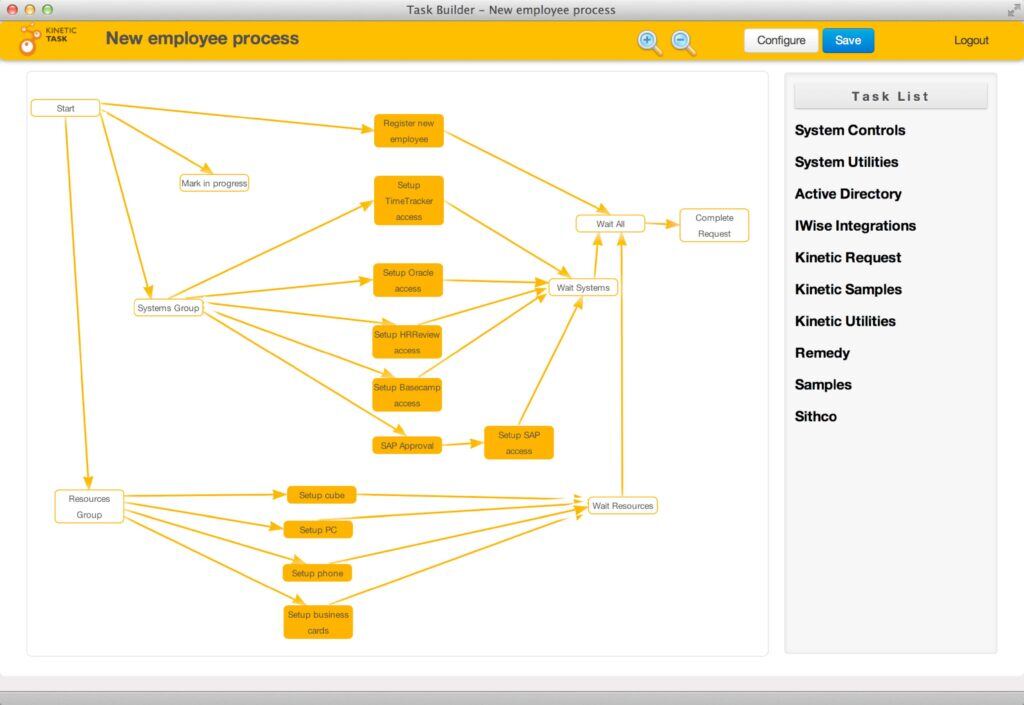
The Task Builder is the graphical design environment for building task and approval workflows. It can coordinate any number of tasks and approvals.
Kinetic Task was first built to automate processes triggered inside IT service management tools such as BMC Remedy. Version 3.0 works with almost any application or database, so it extends to HR, facilities, sales and marketing, finance, logistics, operations and customer service.
New employee onboarding is a good example. In most enterprises it involves a dozen or more manual and partly automated steps across IT and facilities provisioning, payroll and benefits systems, and other internal and external functions. With Kinetic Task, an HR administrator configures those steps in a task tree and points Task at the log files of the HR application’s database. When a record is created or changed, the engine starts the workflow, calls the other systems involved (internal or hosted by a third party), sends notifications and reminders, and enforces the company’s approval policy. The same approach handles employee and contractor moves, adds and changes.
The pattern repeats across the business:
- Facilities: standardize routine maintenance and environmental, security and other building processes.
- Sales and marketing: automate event registration, collateral requests, and the creation and updating of marketing materials.
- Procurement: route requests for approval to control spending and enforce purchasing standards.
- Product development: organize, prioritize and route tasks and issues to the right teams.
- Customer service: handle escalations by issuing RMAs, shipping replacements, sending follow-up surveys and coordinating remediation.
- Finance: automate requisitions and invoicing while enforcing approvals.
- High-volume statement processing at telcos, insurers, credit unions and banks: automate much of the exception handling that is done by hand today.
Not every process is worth automating. Some are too small or too ad hoc even for a lightweight approach. But most large enterprises can find hundreds where tools like Kinetic Task apply, and users see results quickly.
A few other features suit this kind of broad use. Because processes are configured rather than programmed, you can run several versions of the same workflow side by side with different branching, the equivalent of A/B testing. Kinetic Task records how long each step takes to the millisecond, so you can compare versions and keep the faster one.
Kinetic Task also ships with a library of task handlers. They manage users, computers, groups and other objects in Active Directory or any LDAP directory, and connect directly to Amazon EC2, BMC, Google Apps, Microsoft Exchange and SharePoint, Salesforce.com, VMware vSphere and other ITSM, ERP and hosted applications.
Conclusion
Most enterprises have automated only the processes important enough to justify a development project. That leaves thousands of smaller processes across departments running by hand. Kinetic Task 3.0 was built to automate those, and to save the hours that manual processing costs in IT, HR, sales and marketing, finance and facilities.
Sources
- TechTarget SearchCIO: business process management (BPM)
- vom Brocke, J. and Rosemann, M. (2010). Handbook on Business Process Management: Strategic Alignment, Governance, People and Culture (Vol. 1). Berlin: Springer.
- TechTarget SearchCIO: business process automation (BPA)
- Wikipedia: business process automation