Introduction
Enterprise request management (ERM) is a way of centralizing and automating business processes and service requests across departments. The goal is first-time fulfillment: the request is done right the first time, which costs less and leaves the requester happier.
With ERM, one web-based request portal replaces manual processes and the separate request forms each department runs. An automation engine behind the portal handles approvals, scheduling and fulfillment by talking to the systems IT, HR, finance, operations and facilities already use.
The scope is broad, but the implementation doesn’t have to be expensive or disruptive. You can start with one or two processes and expand as each one proves its value. Because ERM works with systems you already have, the extra technology and training needed is often modest.
This paper defines ERM, explains how it differs from departmental service request management, and gives concrete steps for getting started.
How ERM differs from departmental service request management
Service request management (SRM) varies widely in maturity. Many large enterprises have online IT service catalogs, and Forrester Research describes three levels of catalog maturity.[1] At the most basic level, organizations focus on “delivering IT services to consumers through a standard set of choices and/or requests.” At level two, the catalog automates enterprise services. At level three, it acts as a “service broker.”
ERM sits where these levels meet. New-employee onboarding, for example, involves IT, human resources, accounting, facilities and office management. ERM connects and coordinates the back-end applications (the systems of record) in each of those areas, automating where it can to cut the time and cost of fulfillment.
The main differences between ERM and departmental SRM:[2]
- One portal for every department. Users request services from IT, HR, facilities and others in one place, instead of learning a different interface and process for each. New services can be added without rebuilding the portal.
- Fulfillment, beyond ticket logging. ERM automates most or all of the fulfillment tasks: request management, scheduling, approvals, analytics, SLA tracking, status, chargebacks, billing and reporting. It does this by reading from and updating the systems of record the enterprise already runs.
- Any type of service. ERM applies to IT, HR, finance, facilities and requests that span several of them, such as onboarding. The requester sees one interface and the status of the request, without needing to understand what happens behind it.
- Designed from the requester’s side. Processes are built around what the customer needs, which is often different from what is convenient for the teams fulfilling them. As a report from Interactive Intelligence Group puts it, “Many firms perform their business processes with no attempt to delight the customer. Firms have a strong tendency to build processes based on what their internal organization prefers.”[3]
In many shared-service environments, each department accepts requests only through its own system. ERM takes the opposite approach: any request can be made from one portal, and each fulfillment team keeps using its own system of record.
Think small
A common misconception is that the word “enterprise” means a long, expensive project. Anyone who has built an IT service catalog knows how much planning, analysis, form building and testing can happen before users see even a prototype. Much of that effort comes from the constraints of SRM products, which often lock users into a predefined look and feel.
As one Kinetic Data customer put it, “That’s not the way the world works anymore. Often by the time you’re done with the analysis, the business has changed.”
ERM is a framework for approaching service requests, and it lets you work incrementally instead of in one big-bang catalog project. It does require tools flexible enough to change forms and remap processes as needs change, without rewriting core application code. Much of the infrastructure you need is probably already in place.
The approach is enterprise-wide, but each user sees only the requests and processes their role entitles them to. Someone in HR might be able to start an “increase pay rate” process, while a partner might be able to request a change to a product ship date. A flexible entitlement model matters for both the user experience and data security. Done incrementally, it is manageable.
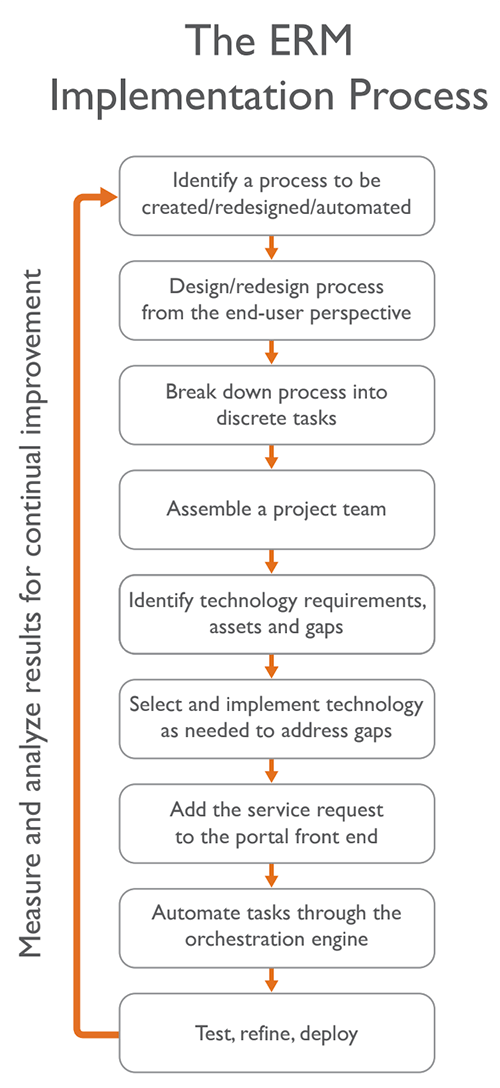
Start with questions like these:
- Which business process problems are most common?
- Which cause the most pain?
- Which problem is the business most eager to fix?
- Which initiatives promise the biggest payback for the least effort?
There’s no need to spend months planning every detail, and it doesn’t matter where your organization sits on the maturity scale. Pick one or a few processes that are especially painful, and assemble a small, informal team: a business analyst, a developer, the process owner, someone from management, and, most importantly, users who can describe the outcome they want in their own words.
Next, break the process into its component tasks. What’s the thorniest part? What’s easiest to fix first? What will make the biggest difference to users? Tackle these one at a time. If you get stuck on the current state of your technology or process, you’ll likely do nothing. When you break processes into achievable goals and build on early wins, your current technology often turns out to be less inadequate than you thought.
Any change can meet resistance. Keep an open dialogue with business users, especially once you start fixing complex or broken processes. One simple approach is a message area in your current service catalog that tells requesters you’re improving a process and invites feedback. For example:
“Hi, We know this is a complex process. We are working right now to make it easier/better/simpler. We’ll keep you updated on these activities right here and welcome your feedback.”
Then work through the problems one at a time. Try each fix in a development system. If it works as planned, push it out, update the user message and move to the next issue. You don’t have to solve every problem in a process before you start making changes, and visible progress shows users the support teams care.
Narrow and shallow to wide and deep
IT service desks are often overloaded with calls. Look at the metrics you already collect and categorize the calls. Are most of them password resets? Software installs? Let users log and track those common requests themselves through a self-service portal. That is a narrow and shallow ERM process: one specific need, in one area, with a relatively easy fix.
The central idea of ERM is using workflow automation to coordinate systems of record across many departments. Once simple requests work, you can apply what you learned to complex requests that span several parts of the enterprise.
New-employee onboarding is a common example. Before one large enterprise adopted ERM, its partly automated onboarding process started with a 60-question online form. Submitting the form sent an email to the service desk, which then created tickets by hand for each department. Creating the tickets alone took about four hours per new hire, and the company was hiring more than 200 people a month.
Building on its work automating simpler self-service requests, the company used a self-service portal to automate most of the ticketing and cut the time per request from four hours to minutes. The process was designed around the new employee. People started work with everything they needed on day one: office space, computer and phone, system access and passwords, a training plan, a security badge and a parking space. Before, new hires sometimes waited days to be minimally set up.
That sequence is what a good ERM strategy looks like. Start small, show value with early wins, build support, then move to the next pain point until the program is wide and deep.
How to start
- Pick the processes. Every business has request processes employees would love to fix. Prioritize the ones that are achievable and will make the most difference to users.
- Break each process into tasks. Start with what you can improve fastest, then move on to the harder problems.
- Assemble a small, informal team. Larger teams are more bureaucratic and slower. Bring users in early and design around their input.
- Find the gaps in your technology. Can you build a self-service portal that grows with you? Can you automate fulfillment and interact with back-end systems such as ITSM, ERP and HR? You may need a new front end and a flexible automation tool, but make sure they work with your systems of record with little or no modification.
- Expand from your successes. Start with the broken processes that affect customers most, then go wider and deeper using what you learned.
The first step
ERM combines one front-end portal for any type of request with back-end automation of the fulfillment tasks. Its four main benefits:
- A better experience for the people making requests
- Business services centralized in one place
- First-time, automated fulfillment
- More value from the systems you already run
Departmental systems work in their own lanes. ERM gives every part of the enterprise one toolset that connects to the back-end systems of record, and it lets you automate one request at a time, expanding as each step proves itself. You can start wherever your organization is today.
Sources
- “Master The Service Catalog Solution Landscape In 2013,” Eveline Oehrlich and Courtney Bartlett, Forrester Research, June 12, 2013.
- “Enterprise Request Management: An Overview,” Kinetic Data white paper.
- “Humanizing Business Process Automation: Optimizing Performance for Employees and Customers,” Jesse Clark and Rachel Wentink, Interactive Intelligence Group, January 2012.